• Deutsch
  • English
  • Login
+49 (0)9427 68 39 000
OTOBO
  • SOFTWARE
    • Software | Overview
    • IT Service Management
    • Customer Service Management
    • Enterprise Service Management
    • Demo
    • Download
    • Documentation
  • SERVICES
    • Overview | Services
    • Consulting
    • Training
    • Customizing
    • OTRS Migration to OTOBO
    • Support
    • Managed Services
    • Support Portal
  • COMPANY
    • About us
    • Carreers
    • Partner
    • Contact us
    • Newsletter
  • RESOURCES
  • COMMUNITY
    • Open Source
    • Community Forum
    • Download
    • Documentation
    • Translate OTOBO
  • Click to open the search input field Click to open the search input field Search
  • Menu Menu

ADD-ON FEATURE

Rocket.Chat Integration

Secure Communication Between Teams and with Customers.

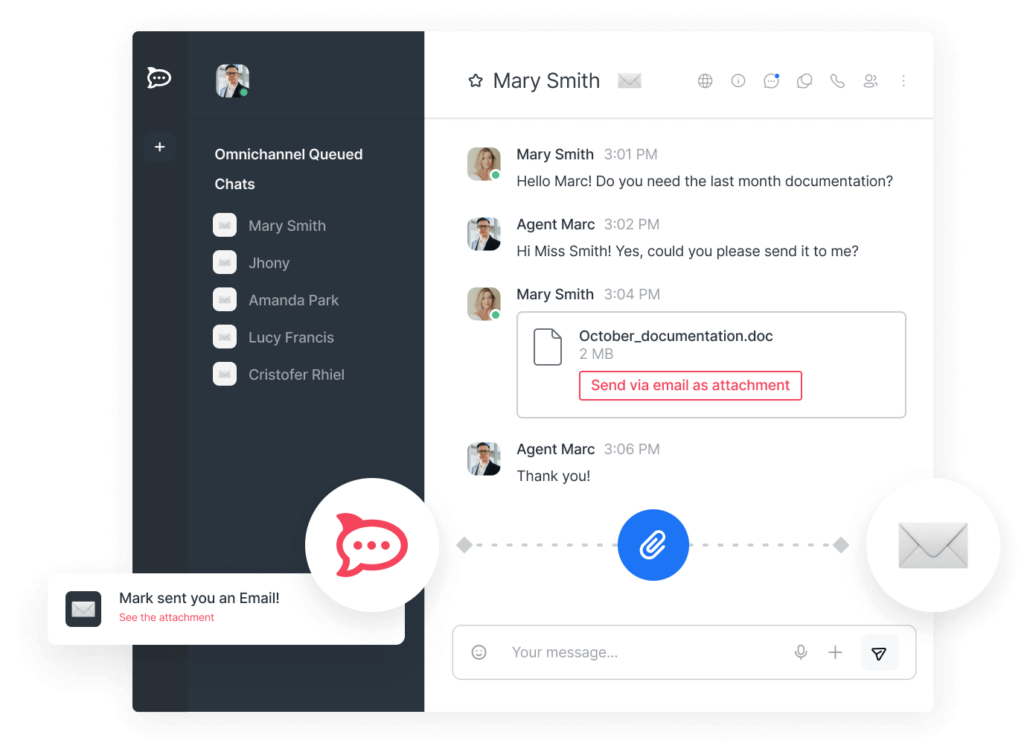
Create new group chats directly from your tickets or utilize existing Rocket.Chat channels to quickly and securely communicate with colleagues and customers.
Added Value

  • Omnichannel collaboration and seamless interaction with your customers
  • A central platform for team-internal and cross-company communication
  • Shortened decision-making paths, saving you valuable time on approvals
  • Full control over your data, thanks to on-premise operation of both systems, ensuring your communication remains secure.
Add-On Feature – Rocket.Chat-Integration 1

Ready to deploy with just a few clicks

Once set up via web service (REST API), Rocket.Chat is available to all authorized users in the menu bar above the ticket view.
User search in OTOBO and Rocket.Chat can be performed alternatively by username or email address. Therefore, centralized user management in a directory or identity service, such as Active Directory, LDAP, or CAS, is ideal.

Create new Rocket.Chat channels directly in the ticket

  • As an OTOBO ticket owner, you can create a new Rocket.Chat channel directly within the ticket based on a pre-defined naming scheme. Only authorized users can see the chat.
  • The Rocket.Chat accounts of the ticket owner and all involved agents and customers in the ticket are automatically added to the chat.
  • The email headers of exchanged emails within the ticket can be investigated for additional recipients and their Rocket.Chat accounts can be added. This requires searching for Rocket.Chat accounts by email address.
  • The ticket owner receives permission to edit, delete, and archive the chat.
    The announcement window of the Rocket.Chat channel contains a link to the ticket and the title of the ticket.

Use existing Rocket.Chat channels

  • If a Rocket.Chat channel already exists for the current ticket, all OTOBO users in the ticket will be shown a link to the existing Rocket.Chat channel.
  • The prerequisite is that the OTOBO user has been automatically or manually added to the channel through the integration. Since the chats are created as private groups, access is regulated accordingly by Rocket.Chat.

Download

The OTOBO feature add-on UniAugsburg-OtoboRocketchat is provided by the University of Augsburg. Thank you!

You can easily install the add-on via the package management of your OTOBO system – Directory Third Party Add-ons – or download the package, including documentation, here.

Download
Search Search

Filter by

  • Add-On Feature
  • Article
  • Case Studies
  • News
  • Release Notes
  • Security Patch

Reset filter

Newsletter | Subscribe to receive news and updates from OTOBO

Company

About us
Careers
Job Opportunities
Become a Partner
Contact us
Newsletter

OTOBO | Simplify work and create exceptional service experiences.

The Source Code Owner and Maintainer of OTOBO.

Software

Service Management Platform
OTOBO Demo
OTOBO Download
OTOBO Documentation

Report a security issues:
security@otobo.org

Services

Support Portal
Consulting
Training
Support
Managed Services
Customizing
OTRS Migration
Find a Partner

Community

Open Source
Community Forum
Contribute
OTOBO Developer
OTOBO@GitHub

© 2026 Rother OSS GmbH | All rights reserved.
  • Cookie settings
  • Imprint
  • Privacy Policy
  • Disclaimer
Link to: OTOBO 10.1.8 Link to: OTOBO 10.1.8 OTOBO 10.1.8OTOBO Security Patch Link to: OTOBO 11.0.0.1 (Beta) Link to: OTOBO 11.0.0.1 (Beta) OTOBO Beta ReleaseOTOBO 11.0.0.1 (Beta)
Scroll to top Scroll to top Scroll to top