OTOBO AI
Search less. Help faster.
OTOBO AI brings past solutions directly into the ticket.
With the LLM of your choice, no lock-in.

OTOBO AI
OTOBO AI brings past solutions directly into the ticket.
With the LLM of your choice, no lock-in.
Over the years, a huge amount of knowledge has piled up in your ticket system: in old tickets, in FAQ articles, in manuals. The trouble is, exactly what you need right now is often hard to find. Especially when you’re new to the team.
As part of OTOBO, the open source ticket system, OTOBO AI brings this knowledge to where it’s needed: right into the ticket.
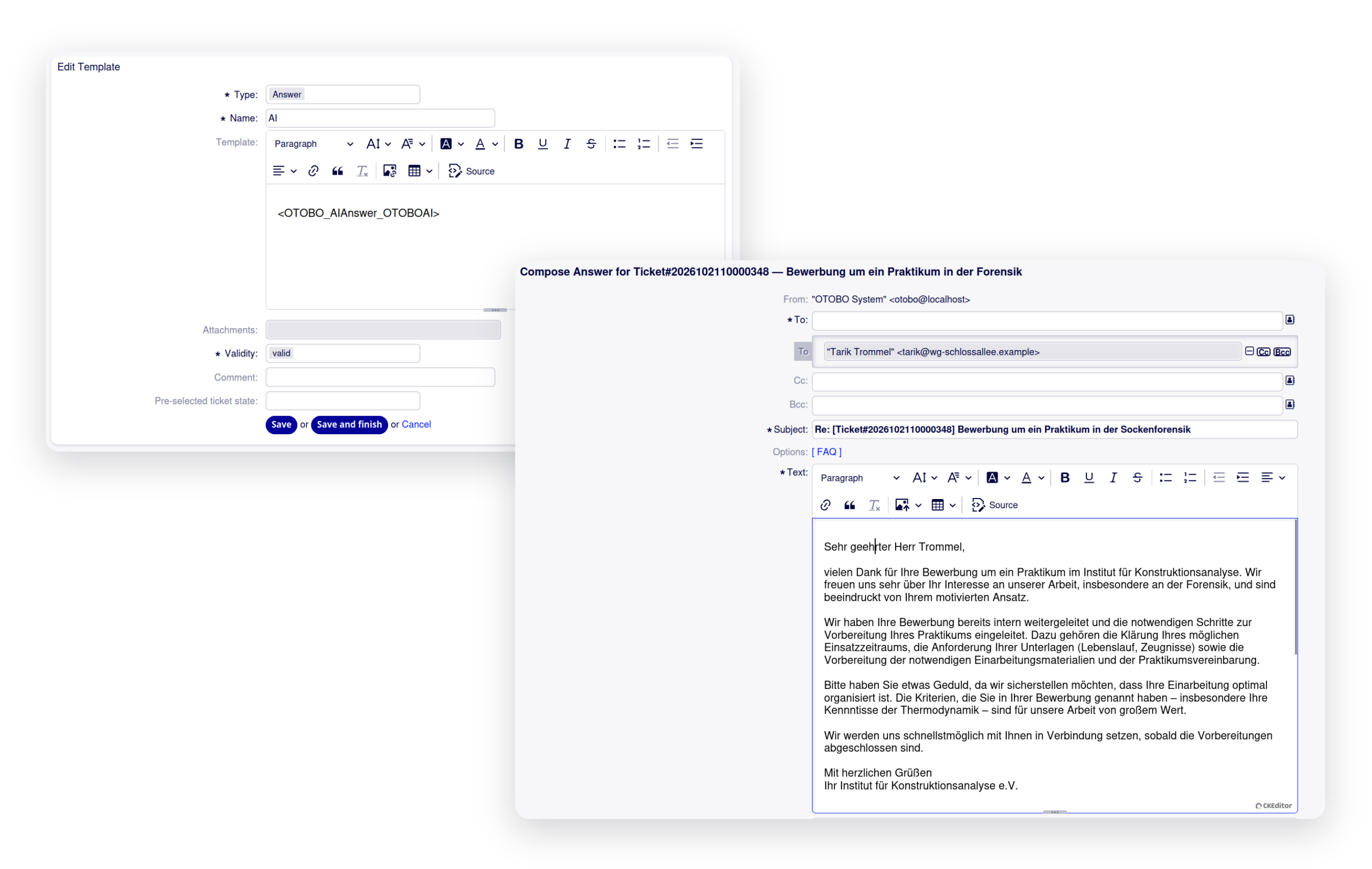
A new request comes in, and the ticket already contains a suggested reply. OTOBO AI generates it based on previous tickets, FAQ articles, and documents you’ve specifically added, taking the context of the request into account.
You review, adjust, and send it without having to spend time searching first. Every suggestion is based solely on the knowledge that has been approved for your queue.
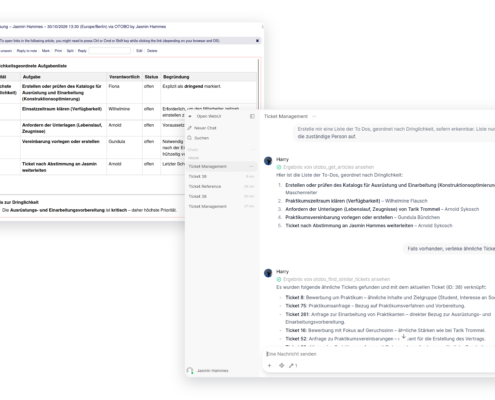
Is the critical piece of information buried somewhere between the twelfth message, a linked ticket, and an old FAQ? Harry — yes, like the OTOBO peacock — has it pulled together in no time. One click in the ticket, and he summarizes the case, finds similar ones, works with you to refine the suggested reply, and drafts FAQ texts. Always with your permissions as an agent.
Already using a different chat solution? You connect it to the ticket via deep link. An MCP server acts as the interface to your OTOBO system.

Multiple products, multiple teams, maybe even multiple tenants in one system? OTOBO AI keeps it all separate. For each queue, you define which knowledge is used and which prompt the AI works with.
That way, product support draws on the manuals that actually apply, and internal IT on its own tickets. This feature, by the way, was added during the beta because a customer needed exactly that.
Already using an LLM, a chat, or your own knowledge base? Then we’ll connect OTOBO AI to what’s already there. Data protection stays in your own hands.
The simplest option: an open-weights model, hosted by us in Germany. No training on your data, no per-request billing. Included in the Enterprise service plan.
You run everything yourself, fully offline if you want. For data that must never leave your premises.
Your knowledge. Your model. Your control.
The AI really shines once the knowledge base, prompts, and data selection fit your day-to-day work. That’s the part we do together.
Together with one of our AI specialists, you work out where the AI will be used and which knowledge feeds into it. One to two setup days are usually enough. Since we develop OTOBO AI ourselves, we know the adjustment points and what has worked in other projects.
Most questions come up along the way: Which prompt fits this queue? Which documents are still worth adding? Where can we optimize the data? Just ask us. As part of your service plan, you get our knowledge and our experience from other projects as well.
The foundation is in place. Many features can be built on top of it with little effort: more actions in the ticket, interfaces and workflows that automate what your team still does by hand today. We implement what you need and feed it back into the standard product.
Working with us comes with the Professional and Enterprise Service Plans, so you work directly with the developers of OTOBO AI.
The Enterprise Service Plan already includes OTOBO Managed AI and one setup day.
Already using OTOBO? OTOBO AI runs on OTOBO 11.0 and later. We help you get started and support you day to day.
OTOBO AI brings AI into OTOBO, on your terms and with an eye toward real everyday value rather than AI hype.
Your team gets response suggestions and a chat right in the ticket — with access to exactly the information it needs for its work. You decide which language model and which chat solution you use, and where both of them run.
When a request comes into a queue with the AI enabled, OTOBO pulls the matching, approved sections from the knowledge base. The LLM uses them to draft a response suggestion, which lands in the ticket. When an agent opens Harry, a deep link passes along the ticket context. The MCP server translates instructions into OTOBO web service calls, using the agent’s permissions.
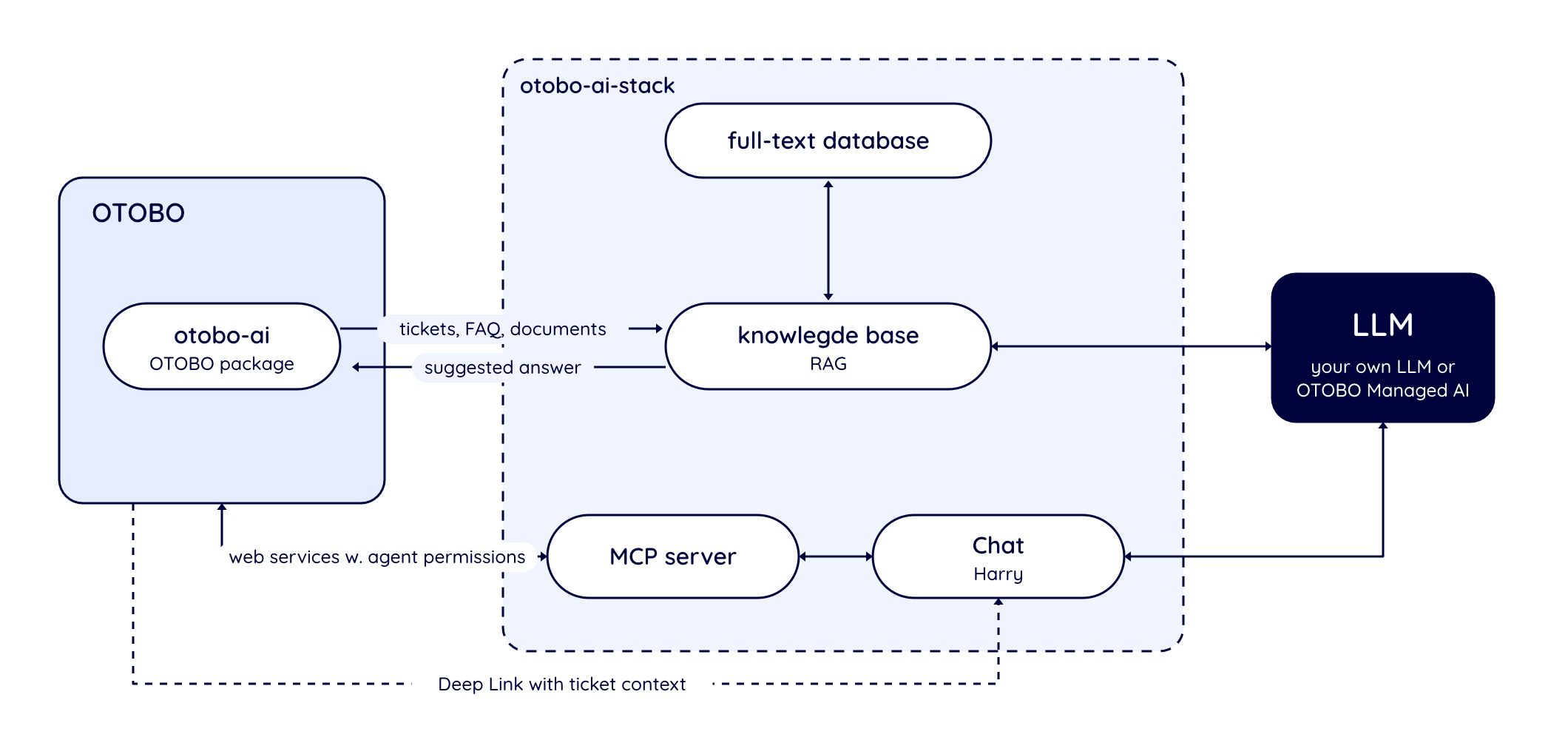
Image generated by AI.
The response suggestions are built from your knowledge base. To set this up, you load tickets, FAQ articles, and your own documents, such as manuals, into a vector database. You decide what goes in. The better your tickets and FAQs are maintained, the better the suggestions become. Supported formats include plain text, Markdown, YAML, and JSON. PDFs and attachments aren’t supported yet — if you need that, we can build it for you. New tickets can be added to the knowledge base automatically within minutes. This is built in, and we’re happy to help you turn it on.
Each team works with its own knowledge base. For each queue, you define whether the AI generates suggestions, which prompt it uses, and which part of the knowledge base it draws on. Labels on the data ensure that each team only gets information relevant to its area, product, or topic. Harry also works with the logged-in agent’s permissions and only sees what that agent can see.
You can use any LLM with an OpenAI-compatible API, or our OTOBO Managed AI. If you bring your own, you’ll need an embedding model and a generation model, plus a model with tool calling for the chat. A chat based on Open WebUI is included. You can replace it with your own solution, as long as it can receive the ticket context from OTOBO. The vector database can be swapped out too — we’ll make the necessary adjustments based on a quote. The knowledge base and the chat work independently; together, they provide the full feature set.
“What’s great about the chat is that it lets you connect pretty much any AI solution that’s already out there, with a deep link straight into the ticket.”
Dr. Arnold Sykosch, Product Owner OTOBO AI
If you run the LLM yourself, your data never leaves your infrastructure — fully offline if you want. In that case, the model’s safeguards are your responsibility. With OTOBO Managed AI, the LLM runs in our German data center. Your content is transmitted only for processing and is never used for training. We log how many requests are made, not what they contain. The chat history stays with you. Monitoring is set up only at your request, and that data is kept for no more than seven days.
OTOBO AI requires OTOBO 11.0 or later and consists of two components:
Your existing workflows stay unchanged. Docker is required even if OTOBO is installed natively.
Learn more: OTOBO AI Guide
Source Code on GitHub
No. Response suggestions land in the ticket, and nothing goes out until an agent sends it. Harry only acts when asked and with the agent’s permissions, and can also work across multiple tickets at once if needed.
Not yet, but there’s strong interest in automatic prioritization and classification. Harry can already move tickets to other queues on request. If you want to take this a step further, get in touch with us. We’d prefer to develop this feature for several customers at once and split the cost among as many of them as possible.
Yes. For every new request, a response suggestion is generated automatically from your knowledge base — that is, from past solutions, FAQs, and your documents. If you want to dig deeper, Harry finds similar tickets in the chat and links them directly. OTOBO also already shows similar tickets out of the box using Elasticsearch.
Get in touch with us. We’ll look at what you need, estimate the effort, and build the feature for you. Since the foundation is already in place, the effort involved is often manageable. After that, the feature becomes part of the standard product. For example, Harry can already draft FAQ texts; in the future, he could create the FAQ entries directly.
Yes, as long as your model is reachable through an OpenAI-compatible API, whether in your cloud or on-premises. The other building blocks are interchangeable too: embedding model, vector database, chat, and MCP server. We’re happy to work with you to figure out whether your setup is suitable and which model fits your use case.
Yes. The otobo-ai-stack requires Docker, while OTOBO itself stays natively installed.
(That said, we recommend Docker for OTOBO itself, too — we’re happy to help with the migration!)
The same applies to OTOBO systems we host for you. Depending on the size of the system, hardware may impose limits; we’ll check this with you in advance.
Yes. External systems and AI agents work through the OTOBO web services, using the permissions of the respective user, for example for tickets, FAQs, or config items. Additional REST interfaces can be connected to the AI, often just through configuration, and we support this with consulting or development work. By default, the MCP server is not reachable from outside. Whether you expose it or the vector database is up to you.
That’s exactly what it’s built for. You decide which data is used and where it flows, and you can run everything on your own infrastructure, all the way to fully offline operation.
With OTOBO Managed AI, your data stays in our German data center, is never used for training, and we only log how many requests are made. We’ll sign a data processing agreement (DPA) with you. Whether this fits your requirements is ultimately for your data protection officer to assess. We’re happy to provide the information needed for that.
There are no license fees: OTOBO AI is open source, just like OTOBO itself.
Costs apply if you bring us in for setup and consulting. This requires a Professional or Enterprise service plan, which also covers support for the AI. Running your own LLM may add infrastructure costs.
If you don’t want to run your own LLM, there’s OTOBO Managed AI. This is included in the Enterprise service plan, along with one setup day. There’s no per-request or per-token billing; a fair use policy applies instead. If you need more, we’ll work something out together. If you upgrade, we’ll credit your existing contract.
Yes, of course.
You can install OTOBO AI yourself — the docs and code are open. But it only really shines once the knowledge base, prompts, and data selection fit your day-to-day work, and that’s where we help, drawing on our experience from other projects.
In one to two setup days, we tailor the AI to your setup together, and once it’s running, we help with any questions as part of ongoing support.
This requires a Professional or Enterprise service plan; in Enterprise level, one setup day is already included.
Tell us about your use case – or learn more about OTOBO first.