• Deutsch
  • English
  • Login
+49 (0)9427 68 39 000
OTOBO
  • SOFTWARE
    • Software | Overview
    • IT Service Management
    • Customer Service Management
    • Enterprise Service Management
    • Demo
    • Download
    • Documentation
  • SERVICES
    • Overview | Services
    • Consulting
    • Training
    • Customizing
    • OTRS Migration to OTOBO
    • Support
    • Managed Services
    • Support Portal
  • COMPANY
    • About us
    • Carreers
    • Partner
    • Contact us
    • Newsletter
  • RESOURCES
  • COMMUNITY
    • Open Source
    • Community Forum
    • Download
    • Documentation
    • Translate OTOBO
  • Click to open the search input field Click to open the search input field Search
  • Menu Menu

RELEASE NOTES

OTOBO 11.1 (Beta)

More Power for Your Service Management

  • NEW FEATURES
  • CHANGES
  • ENHANCEMENTS
  • RELEASE DATE:
  • RELEASE TYPE:
  • RELEASE:
  • 24 June 2026
  • Beta Release
  • 11.1 (Beta)

OTOBO 11.1 is packed with quality-of-life improvements and delivers real value in modeling, integration & system connectivity, and administration.

What’s new in OTOBO 11.1 (Beta)

HIGHLIGHT 1

Ticket Handling – Better Overview, Faster Results

Fewer clicks, more context, faster decisions. And this is just the beginning. With version 11.1, working within the ticket – where agents spend the majority of their day – is now faster and more intuitive.

  • Elasticsearch – Search at a New Level
    Additional dialogues, field-based queries, and an extended syntax – for example Title:Test* AND Body:Test* or Boolean operators with AND / NOT – make the fast, concurrent search more precise. Anyone using Elasticsearch will notice the difference immediately.
  • Similar Tickets – Always in Sight
    Powered by Elasticsearch, the new ‘Similar Tickets’ widget displays related tickets directly in the Ticket Zoom view. This eliminates the need for manual searches, as similar tickets are shown automatically. It is one of the tasks soon to be handled by the OTOBO AI, Roboto.
  • Full Control Over the Ticket History
    Article editing, including time tracking, is now a standard feature – no separate package required. Ticket articles can be edited, deleted, or pinned directly within the Ticket Zoom view. Easily correct mistakes, remove clutter, and keep key information in sight to ensure your ticket history stays clear and organized.
  • Filters That Work for You
    In ticket lists, multiple filters can now be set parallely. Configure them once, enjoy the perfect view permanently.  No more manual re-filtering, no more searching through long lists. The right view is always just one click away.

HIGHLIGHT 2

Process Management – Model with Precision, Control with Confidence

With 11.1, process management in OTOBO evolves significantly – in maturity, flexibility, and the depth to which processes can be modeled. Anyone building and maintaining complex processes will notice the difference immediately.

  • Structure Processes, Maintain a Clear Overview
    As complex process setups grow, they can quickly become cluttered. Namespaces logically group process elements, ensuring admins keep a clear overview even within highly intricate workflows.
  • Global or Process-Specific – You Decide
    Process elements can now be marked as either global or process-specific. A simple checkbox determines whether an element should be available across all processes – or restricted to a specific one.
  • Logical Transitions
    Transitions now support Not, Any, and All logic – including checks for empty fields. Dynamic fields within a set can be addressed directly via Field1::Field2. The result: process logic that fits reality – not the other way around.
  • Templates That Work Everywhere
    The ticket templates you know and love can now also be used in process dialogs. Using templates ensures that content is captured cleanly from the very start.
  • Customers See What They Need
    Process and activity details can now be hidden within the customer interface. Customers see exactly what they need – and nothing that distracts them. The result: fewer inquiries, fewer misunderstandings, reduced support overhead.
  • Less Searching, More Control
    Anyone managing large numbers of processes knows the pain point: searching takes up valuable time. Improved sorting for process elements in the admin area completely eliminates this issue – making elements faster to find and keeping management straightforward, even as complexity grows.

HIGHLIGHT 3

Dynamic Fields – Information Precisely Where Needed

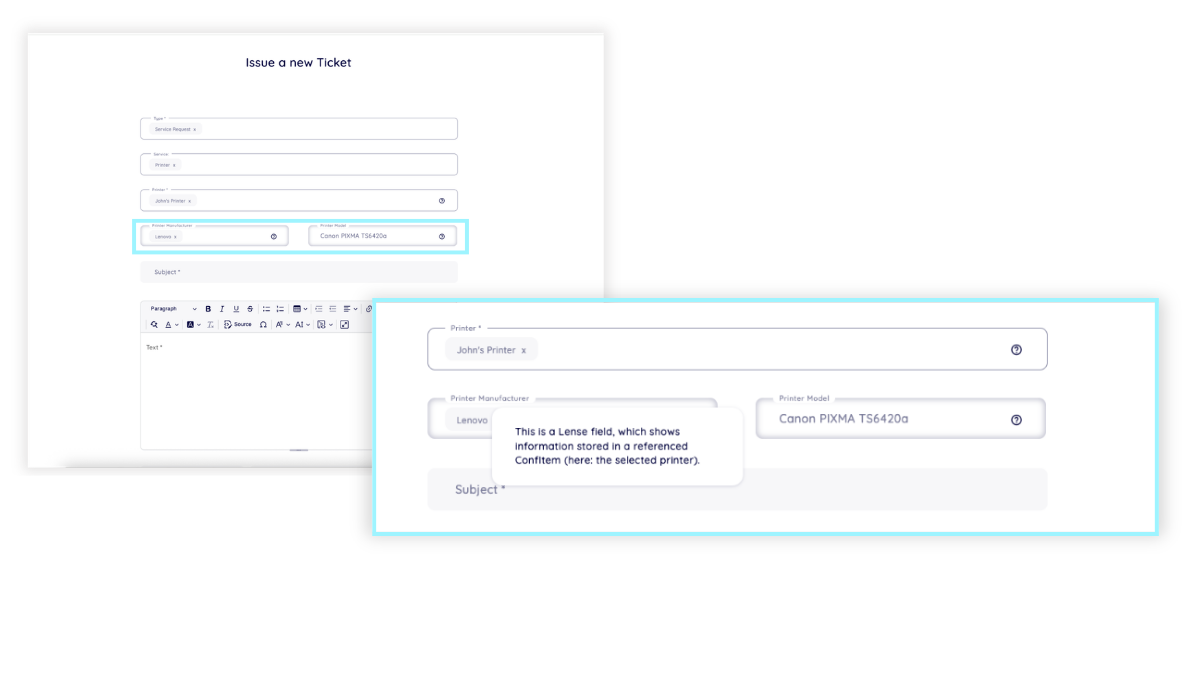
In OTOBO, we call them “Dynamic Fields” – but they are so much more. These fields only display when and just where they are needed. Provide information on linked objects directly within the ticket. Build forms that seamlessly adapt to the context. With 11.1, Dynamic Fields turn even more powerful.
OTOBO 11 Beta

Only What’s Relevant – At the Right Moment
Dynamic Fields of the “Reference” type link FAQ articles, services, customers, customer users, or ConfigItems directly to a ticket, or to each other. Lenses provide instant insight into the details of these linked elements – without ever needing to open the object itself. Fewer clicks, no context switching – all relevant information precisely where it’s needed. The result: reduced handling time per ticket and more time for customers.

HIGHLIGHT 4

Security – Modern Authentication, Secure Connectivity

With 11.1, OTOBO takes security and authentication to the next level. Modern standards, centralized management, and encrypted connectivity – no workarounds, no third-party packages.
OTOBO 11.1 Beta 1
  • Manage Tokens Centrally – OAuth Token Management
    OTOBO now features a dedicated token management system. Tokens enable secure authentication with external services – covering email connectivity via POP, IMAP – now also SMTP –, as well as outgoing web services. No more expired passwords, no searching through scattered configurations, and zero administrative overhead when passwords change. Everything is centralized – everything is under control.
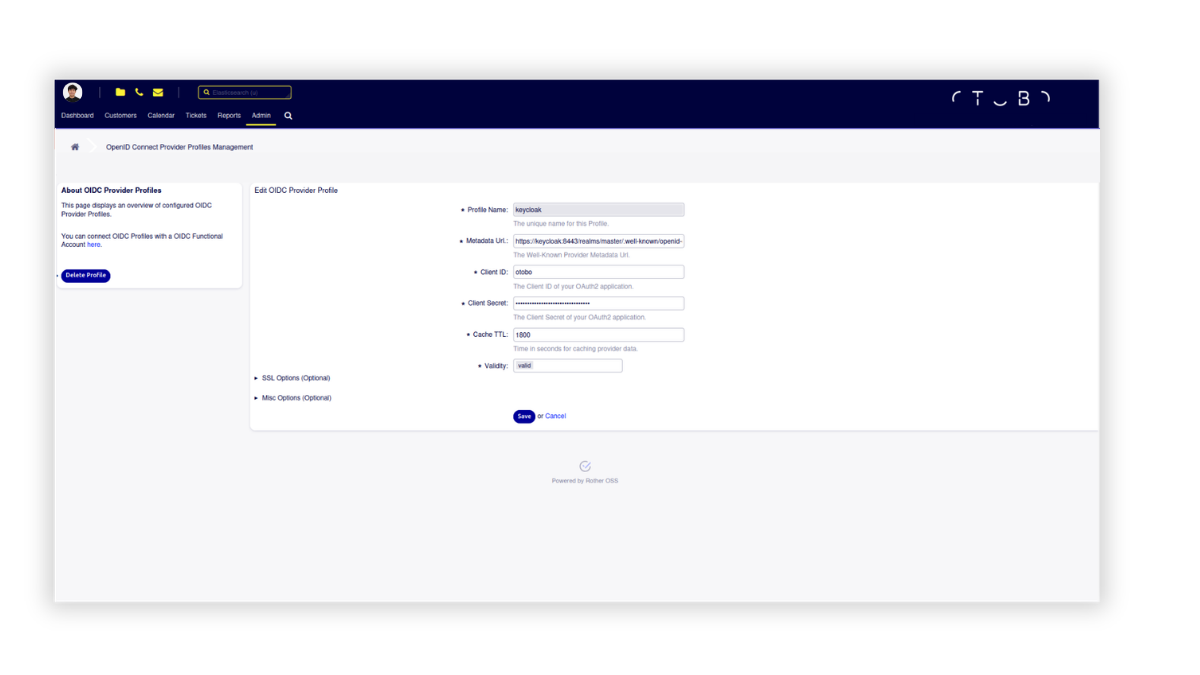
  • One Login for Everything – OpenID Connect
    Logging into OTOBO via OpenID Connect enables Single Sign-On (SSO) for both agents and customers. No separate OTOBO passwords required – instead, it offers a seamless integration into your existing corporate authentication. One login, all systems, no password chaos.
  • Encrypted Database Connectivity
    The DB backend transitions from DBD::mysql to DBD::MariaDB – actively maintained, more modern, and optimized for current database versions. Encrypted connectivity for both MySQL and MariaDB is now available, with authentication plugins selectable directly within the installer. Sensitive data remains secure – without the need for manual workarounds.
  • OTOBO and OTOBO Docker – Now Independent
    Starting with 11.1, OTOBO and OTOBO Docker feature independent release cycles. Updates can be applied completely separate from one another – eliminating dependencies between the two. Expect clearer version details in example files, greater maintenance flexibility, and continuously updated ‘latest’ images.

HIGHLIGHT 5

Data Exchange and Integration – Significantly Simplified

OTOBO 11.1 simplifies data exchange – both incoming and outgoing. It brings enhanced compatibility with external systems and full control over configurations and objects. All included as standard, with no extra packages required.

  • Web Services That Adapt
    Attachments can now be transferred via multipart/form-data – a prerequisite for direct integration with JIRA, OpenProject, and other systems that require this specific format. For outgoing data, you can now enforce specific formats such as arrays to ensure the interface receives exactly what it expects. Additionally, OAuth is now available as a supported authentication method for outgoing web services.
  • Export Configurations – And Reuse Them
    Entire configuration packages – including processes, Dynamic Fields, notifications, queues, and ACLs – can now be exported to .csv files and imported back into the system. This can be done directly within the respective settings screen – no detours, no manual rebuilding.
  • Export Objects – Migration Made Easy

    Moving forward, tickets, customers, customer users, and ConfigItems can be seamlessly transferred directly under Admin → Import/Export. Whether for a migration or straightforward data exchange – starting with 11.1, both are available out of the box in the OTOBO standard.

Technical Notes

The update process will create a new folder structure – any manual customisations must be packaged in advance or reapplied afterwards.

The MailAccountOAuth2 package has been integrated into the standard – manual adjustments are required during the upgrade.

Changes

  • [Change] Caching in the file system instead of Redis Cache for Docker based installations [#5728]
  • [Change] Improved file handling for OTOBO updates [#5077]
  • [Change] Replacement of the MailaccountOAuth2 package – see warning above! [#5652]
  • [Change] Reworked article actions sysconfig structure [#5126]
  • [Change] Support for SessionUseCookie = 0 removed [#4426]

Enhancements

  • [Enhancement] OIDC/Oauth2 authentication for web services [#4450]
  • [Enhancement] Process Management: Global vs. local scoping and namespaces for process elements [#5589]
  • [Enhancement] Process transition validation now supports additional array operators and make them work with DynamicField Sets. [#5590]
  • [Enhancement] Ticket lists support multiple filters now [#1831]
  • [Enhancement] Integrated Elasticsearch-Extension package into the core [#5350]
  • [Enhancement] New: Elasticsearch Similar Tickets Widget [#5508]
  • [Enhancement] Integrated ProcessTicketTemplates package into the core – use ticket templates in process dialogues, too [#5436]
  • [Enhancement] Integrated CustomerTicketSearch package into the core – full-text search in the customer interface [#5161]
  • [Enhancement] Integrate package ExtendedArticleEdit into core – edit the text of external articles (not for emails), article dynamic fields, and further attributes as well as their visibility [#4258]
  • [Enhancement] Include Package CK5-FullWindowMode into core – maximise the editor mask [#5415]
  • [Enhancement] New: Checklists in CK5 Editor [#5415]
  • [Enhancement] Include Package TicketUpdateOperationExternalIdentifier into core – supporting external identifiers in automatic ticket updates via external systems [#5413]
  • [Enhancement] Include package ImportExportStandardObjects into core – easy import/export for standard objects [#5148]
  • [Enhancement] Include package ImportExportCustomerCompany into core – easy import/export for customer companies [#5005]
  • [Enhancement] Include package PostMasterXFromHeader into core – set the customer user automatically based on information within the email body [#5008]
  • [Enhancement] Show/Hide Inner Set Fields – ACLs supported for Dynamic Fields within Sets now, too [#5524]
  • [Enhancement] Enable HideShow for AgentTicketCompose  – ACLs supported in the Reply mask in the agent interface [#3537]
  • [Enhancement] Customer interface: Ticket age switches to create time in ticket lists automatically after a configurable amount of time (default 24h) [#1826]
  • [Enhancement] Selection of DB authentication plugin in the installer is supported [#5102]
  • [Enhancement] Ticket templates support defining the next ticket state now [#5542]
  • [Enhancement] Lens Fields can point directly to Reference Fields now, too [#3186]
  • [Enhancement] Lens Fields can point directly to Sets now [#4910]
  • [Enhancement] You can set the exact datatype for web services in XSLT now (Boolean, array) [#5507]
  • [Enhancement] Web services support multipart/formdata as well now (attachments!) [#5444]
  • [Enhancement] Added validity state for PostMaster Filters [#4200]
  • [Enhancement] Added a StopAfterMatch indicator in AdminPostMasterFilter Overview [#1618]
  • [Enhancement] Customer interface: Dynamic fields for the Reply Dialogue can be added in DynamicFieldScreens now [#4355]

OTOBO 11.1.0 (Beta2) – Security Patch Release 

➞ More Informations

Thank you to the community and all contributors!
Now it’s time to: test the Beta, share your feedback – so the stable release can follow soon.

Next steps

Update to OTOBO 11.1

We recommend updating your system.

➞ Download

OTOBO 11.1 Change Log

A comprehensive overview of all current and past changes.

➞ All Changes

Update, Upgrade, or Questions?
We’re here.

Support customers can simply get in touch via the portal or give us a quick call. No support contract yet? Perhaps now is the right time.

Kontakt
Search Search

Filter by

  • Add-On Feature
  • Article
  • Case Studies
  • News
  • Release Notes
  • Security Patch

Reset filter

Newsletter | Subscribe to receive news and updates from OTOBO

Company

About us
Careers
Job Opportunities
Become a Partner
Contact us
Newsletter

OTOBO | Simplify work and create exceptional service experiences.

The Source Code Owner and Maintainer of OTOBO.

Software

Service Management Platform
OTOBO Demo
OTOBO Download
OTOBO Documentation

Report a security issues:
security@otobo.org

Services

Support Portal
Consulting
Training
Support
Managed Services
Customizing
OTRS Migration
Find a Partner

Community

Open Source
Community Forum
Contribute
OTOBO Developer
OTOBO@GitHub

© 2026 Rother OSS GmbH | All rights reserved.
  • Cookie settings
  • Imprint
  • Privacy Policy
  • Disclaimer
Link to: Perl Developer | Fullstack Link to: Perl Developer | Fullstack Perl Developer | FullstackPerl Developer | Fullstack 2 Link to: OTOBO 10.1.18 Link to: OTOBO 10.1.18 OTOBO Security PatchOTOBO 10.1.18
Scroll to top Scroll to top Scroll to top