
Schlagwörter: OTRS Migration to OTOBO
-
AutorBeiträge
-
-
15. Oktober 2022 um 12:46 Uhr - Views: 1514 #14037
I am not understanding the migration instructions in the manual and hope someone can help.
I have OTRS in a virtual environment and OTOBO installed in a different virtual environment. Neither installation uses docker, so I guess I have a Native installation in both places.
The database in use is MariaDB, but different versions.
Can someone explain to me how to get the necessary data from OTRS to OTOBO for the migration.
I like the idea of maybe getting the database from OTRS installed into the MariaDB on OTOBO and being able to access it from the otobo virtual environment for the migration if possible, but do not know how to do that.
I don’t know how to mount or copy the OTRS directories needed from the OTRS virtual environment to the OTOBO virtual environment.
Any help someone could give me would be greatly appreciated.
-
15. Oktober 2022 um 13:01 Uhr #14038
Hi Jeffrey,
your case sounds indeed like the standard case. This is the case which is called „The general migration strategy“ in https://doc.otobo.org/manual/installation/10.1/en/content/migration-from-otrs-6.html . You only have to make sure that condition 5 of https://otobo.io/en/forums/topic/otrs-6-to-otobo-10-1-5-migration-help-needed/ is met. But that is only problematic when OTRS and OTOBO are in different networks with a firewall in between. The actual data migration is done by the web server. Put simply, migration.pl selects data in the OTRS database and inserts it into the OTOBO database.
Best regards,
Bernhard
-
15. Oktober 2022 um 13:23 Uhr #14039
I still do not understand the steps, they mostly refer to docker installation and concentrate on step a and there does not seem to be any documentation for step b.
I might be that it would be better to just migrate all the ticket data / attachments as the OTRS install belonged to a previous company and the new OTOBO install a new company, so mail settings, domain and other settings will all be different in OTOBO.
Is it possible to migrate for instance all the ticket data, ticket attachments, queues, the FAQ data, the company, client data, dynamic field information, just the data portion?
-
15. Oktober 2022 um 14:12 Uhr #14040
Hi Jeffrey,
the general migration strategy is pretty much the same for the Docker and the non-Docker case. Just ignore the optional steps. If you have suggestions for making the instructions less confusing, then you can submit them via https://github.com/RotherOSS/doc-otobo-installation/blob/master/content/migration-from-otrs-6.rst.
What do you mean by step a and step b? The steps in https://doc.otobo.org/manual/installation/10.1/en/content/index.html are numbered from 1 to 6.
Regarding your question about data only migration I’m not sure about your situation. Does the new OTOBO installation already contain tickets of the new company? In that case we are dealing with a merge, which is not covered by the migration guide. But if only few settings have changed, than I would recommend to do a regular migration and then adapt the changed settings. My advice is to consider the first migration only as a test migration and to do the final migration only after all issues have been sorted out.
Best regards.
Bernhard
-
25. Oktober 2022 um 10:55 Uhr #14123
Hello bes,
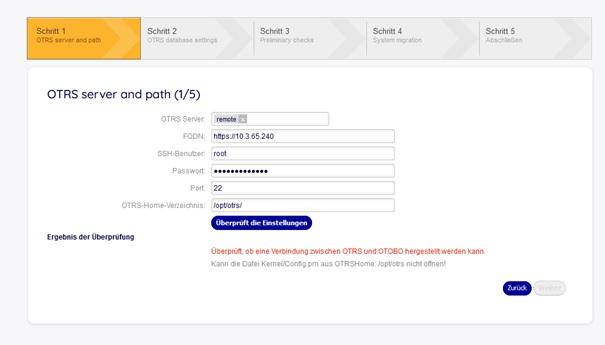
I am facing an issue on the very first step of migration(Link: http://HOST/otobo/migration.pl).
I guess there is a connection problem, but I have given all the right username and password.Thank You so much in advance.
Regards
Z.bhatti

-
2. Januar 2023 um 14:19 Uhr #14500
Hi Z.bhatti,
you dont need to type https:// in FQDN just ip is enough and make sure that database remote access is granted on otrs database.
Br,
Bilal
-
-
-
AutorBeiträge



- Du musst angemeldet sein, um auf dieses Thema antworten zu können.