• Deutsch
  • English
  • Anmeldung OTOBO Community
+49 (0)9427 68 39 000
OTOBO
  • SOFTWARE
    • Software | Überblick
    • IT Service Management
    • Customer Service Management
    • Enterprise Service Management
    • Demo
    • Download
    • Dokumentation
  • SERVICES
    • Überblick Services
    • Beratung
    • Training
    • Entwicklung
    • OTRS Migration zu OTOBO
    • Support
    • Managed Service
    • Support-Portal
  • UNTERNEHMEN
    • Über uns
    • Karriere
    • Partner
    • Kontakt
    • Newsletter
  • RESSOURCEN
  • COMMUNITY
    • Open Source
    • Community Forum
    • Download
    • Dokumentation
    • OTOBO übersetzen
  • Click to open the search input field Click to open the search input field Suche
  • Menü Menü
Ansicht von 5 Antwort-Threads
  • Autor
    Beiträge
    • 19. Oktober 2020 um 18:04 Uhr - Views: 1261 #9152
      Korost
      Teilnehmer

        Hello friends,

        I need that before the customer opens the ticket, he chooses the service first, is it possible?

        And where do I configure this?


        Thanks.

      • 21. Oktober 2020 um 1:06 Uhr #9161
        crythias
        Teilnehmer

          (Taking from OTRS base/historical info)

          You can make the service a required entry.

          This would be Ticket::Frontend::CustomerTicketMessage###ServiceMandatory in SysConfig.

        • 24. Oktober 2020 um 1:33 Uhr #9170
          Korost
          Teilnehmer

            Thank you very much for your help, but the service categories did not appear on a previous screen.
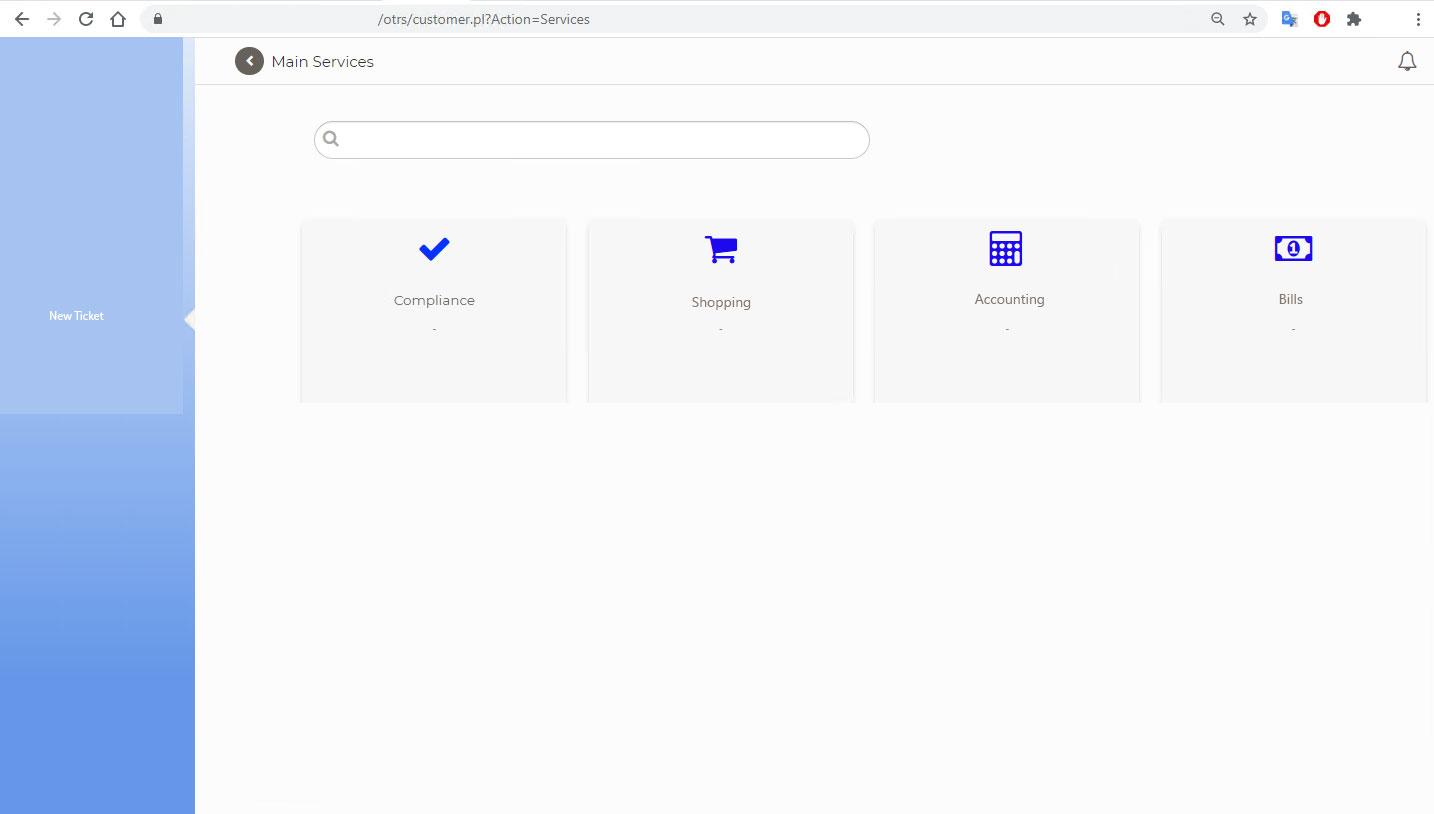
            I had seen an example, which at the otobo / otrs, the address looked like this:

            http://1.1.1.1/otobo/customer.pl?Action=Services

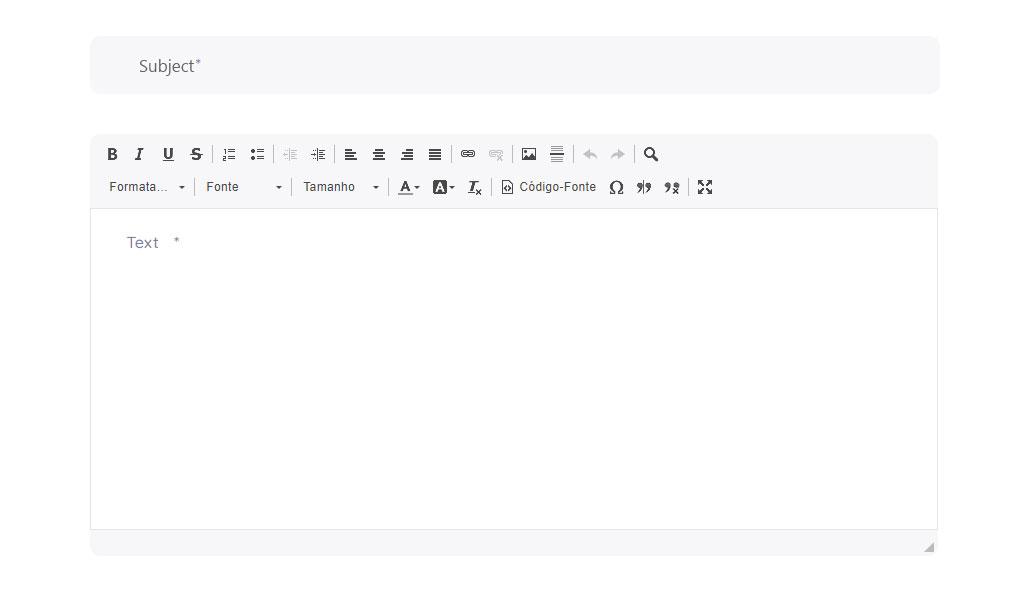
            And on this screen the customer can choose the service and then the ticket screen for him to put the subject and the text / attachment.

            If you find a tutorial, you can pass it to me, I searched on google and I was not successful :(

            Thanks.
            <div id=“gtx-trans“ style=“position: absolute; left: -10px; top: 222px;“>
            <div class=“gtx-trans-icon“></div>
            </div>

            • 24. Oktober 2020 um 3:04 Uhr #9172
              Stefan Rother
              Administrator

                Dear Korost,

                I hope you are feeling well and you and your family are healthy.

                Sorry, I don’t know a Dialog like /customer.pl?Action=Services in otrs or otobo. Normally, the customer uses https://fqdn/otobo/customer.pl?Action=CustomerTicketMessage to create a ticket (and to choose the service before creating the ticket).

                Could you explain your needed functionality a little more in detail, please? Perhaps it is a customer development?

                I wish you a nice weekend!

                Stefan

                Team OTOBO

            • 25. Oktober 2020 um 14:46 Uhr #9182
              Korost
              Teilnehmer

                Hello Dear Stefan,

                I drew what I want:

                1º When the customer chooses “new ticket”, this screen shows all the service categories that he must choose,

                after he chooses, the subcategory will appear and finally the ticket screen will appear

                it is possible?


                Thanks for help and have a great day.

              • 26. Oktober 2020 um 7:01 Uhr #9184
                Sven Oesterling
                Administrator

                  Hello Korost,

                  if you are having this screen in OTRS you are using a package which extends it, this is not part of the standard (you can have a look in index.pl/Action=AdminPackageManager). Porting this package will unfortunately quite certainly not work with our tool alone, because the whole customer frontend css changed. We could help you with this, if you need it, though, if you contact our sales team (hello@otobo.de).

                  Another option would be, to use the customer dashboard for this, in otobo. This, however is not yet as flexible as we intend it to be at some point in time. In general the approach is the following: If you open https://server/otobo/customer.pl?Action=CustomerTicketMessage&ServiceID=x by changing x to „1, 2, 3, …“, you can directly choose the service for the ticket. If you go to the SysConfig and search for „CustomerDashboard::Tiles“, you can add those links to the toolbox. Alternatively and probably nearer to what you want, would be, to change several tiles of the dashboard to „TileFeaturedLink“. You could just adapt the SysConfig options, don’t worry about the names – but to really make this pretty, you would most likely want to change the css, too, and we don’t have a tool yet, which makes this easy, at the moment it has to be done manually, and together with the responsiveness, this is rather complex. We could help you here, too, of course.

                  Best regards, Sven

                • 26. Oktober 2020 um 20:15 Uhr #9187
                  Korost
                  Teilnehmer

                    Hello Sven,

                    got it, thank you.

                    Att.

                    Korost

                • Autor
                  Beiträge
                Ansicht von 5 Antwort-Threads
                • Du musst angemeldet sein, um auf dieses Thema antworten zu können.

                Foren durchsuchen

                Anmeldung

                Anmeldung

                Konto erstellen
                Passwort vergessen?

                Login via Social

                Profil

                Bitte vervollständigen Sie nach der Registrierung Ihr Profil, das vereinfacht die spätere Kommunikation enorm. Ihre Profileinstellung finden Sie, wenn Sie auf Ihr Avatarbild klicken.

                Sie können Ihren Avatar ändern, indem Sie sich mit Ihrer E-Mail-Adresse unter gravatar.com registrieren.

                Letzte Aktivitäten

                • Dynamische Felder in AgentTicketNote mit ACL verstecken
                • FAQ: kaputtes Copy & Paste von Bildern zwischen Artikeln
                • Benachrichtigung „Ticket wurde mir entzogen“ möglich?
                • Statistik Anzahl Tickets pro Agent
                • Docker: Ändern des redis Hosts

                Unternehmen

                Über uns
                Karriere
                Stellenbörse
                Partner werden
                Kontakt
                Newsletter

                OTOBO | Simplify work and create exceptional service experiences.

                Die Source Code Owner und Maintainer hinter OTOBO.

                Software

                Service Management-Plattform
                OTOBO Demo
                OTOBO Download
                OTOBO Dokumentation

                Security-Problem melden:
                security@otobo.org

                Services

                Support-Portal
                Beratung
                Training
                Support
                Managed Services
                Erweiterung
                OTRS Migration
                Partner finden

                Community

                Open Source
                Community Forum
                Mitmachen
                OTOBO Developer
                OTOBO@GitHub

                © 2026 Rother OSS GmbH | All rights reserved.
                • Cookie-Einstellungen
                • Impressum
                • Datenschutz
                • Haftungsausschluss
                Nach oben scrollen Nach oben scrollen Nach oben scrollen