• Deutsch
  • English
  • Anmeldung OTOBO Community
+49 (0)9427 68 39 000
OTOBO
  • SOFTWARE
    • Software | Überblick
    • IT Service Management
    • Customer Service Management
    • Enterprise Service Management
    • Demo
    • Download
    • Dokumentation
  • SERVICES
    • Überblick Services
    • Beratung
    • Training
    • Entwicklung
    • OTRS Migration zu OTOBO
    • Support
    • Managed Service
    • Support-Portal
  • UNTERNEHMEN
    • Über uns
    • Karriere
    • Partner
    • Kontakt
    • Newsletter
  • RESSOURCEN
  • COMMUNITY
    • Open Source
    • Community Forum
    • Download
    • Dokumentation
    • OTOBO übersetzen
  • Click to open the search input field Click to open the search input field Suche
  • Menü Menü

Schlagwörter: imaps ; fetchmail ; mail ; email ; fetch

Ansicht von 4 Antwort-Threads
  • Autor
    Beiträge
    • 2. Mai 2022 um 20:56 Uhr - Views: 1544 #13155
      Diego Ritunnano
      Teilnehmer

        Hello,

        I’m having a big problem with Otobo 10.0.15 (not Docker) when it does the fetch of my mail account via IMAPS.

        I have already configured a Outlook365 mail account with IMAPS in the system, and it works, as long as the mails do not have any images embedded on its body.

        It does not matter how much mails are in the inbox, if any of them has an image embedded, the Daemon starts failing over and over while trying to fetch it, and doesn’t fetch any other mail from inbox, causing our system to being unable to receive mails for some time.

        In order to get this working again I use to manually archive those mails, and after fetching the rest of them (often restarting the daemon because it freezes) I try to fetch the mailbox again sending those „image mails“ back to inbox. Sometimes, after a while of opening connections and failing, those mails are fetched, but it would be imposible if I don’t do the previous manual steps.

        I have already tried configuring FetchMail, but it throws „There was an error executing /usr/bin/fetchmail -a –ssl: There was a syntax error in the arguments to fetchmail“, and I don’t think that it would solve our problem neither.

        Finally, to give you some more information, for testing, the max email size was adjusted to 50MB (although none of the mails received sized more than 3MB), and Otobo seems to be working fine when receiving mails with attachments. It seems that the problem starts when the images are embedded, as I detailed before.


        Thank you very much for your help, this is urgent for us, because we work a lot with mails and images embedded.

      • 3. Mai 2022 um 1:49 Uhr #13158
        Stefan Rother
        Administrator

          Hi Diego,

          strange Problem, I never hear something like that.

          We need more information to find the problem. Please can you execute the MailAccountFetch script manually, when a korrupt Mail is given:

          root> su - otobo

          otobo> bin/otobo.Console.pl Maint::PostMaster::MailAccountFetch --debug

          After that please execute:

          otobo> bin/otobo.CheckModules.pl --all

          And please provide the output of the scripts with more Information about your OS, database and configuration specials here.

          I wish you a nice evening,

          Stefan Rother

          Team OTOBO

          • 20. Oktober 2022 um 1:51 Uhr #14090
            Pradeep Rajasekaran
            Teilnehmer

              I have the same issue.

              There is no error in mail fetch, but what I noticed was JPG images are fetched without any issues but PNG images are not fetched.

              Is there any settings for what type of documents are fetched?

          • 20. Oktober 2022 um 3:13 Uhr #14091
            Pradeep Rajasekaran
            Teilnehmer

              Sorry my bad.

              It’s actually the tif images which are not shown.

            • 20. Oktober 2022 um 3:59 Uhr #14092
              Pradeep Rajasekaran
              Teilnehmer

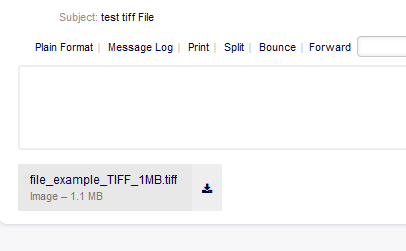
                Although the image is not shown for obvious reason (TIF), it is still there as an attachment but there is no way to download this from OTOBO.

                When replying/forwarding the email the TIF file still get attached.

                So it would be great to have an option to download/save inline images or convert inline images to attachments.

              • 25. Oktober 2022 um 14:30 Uhr #14131
                marcel-graf
                Teilnehmer

                  Hello, we have no problems to open attached Files in Otobo 10.0.15 Docker installation.

                  Is your file attached or embeddet, example as base64 code?

                  • 31. Oktober 2022 um 7:47 Uhr #14165
                    Pradeep Rajasekaran
                    Teilnehmer

                      No problems with attached images.

                      It is the embedded TIF which are not shown in the browser or shown as an attachment.

                      Apparently apple (maybe outlook too) allows TIF images to be embedded in emails, but when the emails are fetched into OTOBO, the only way to get those files is to forward it to a different email client which shows the image as an attachment.

                • Autor
                  Beiträge
                Ansicht von 4 Antwort-Threads
                • Du musst angemeldet sein, um auf dieses Thema antworten zu können.

                Foren durchsuchen

                Anmeldung

                Anmeldung

                Konto erstellen
                Passwort vergessen?

                Login via Social

                Profil

                Bitte vervollständigen Sie nach der Registrierung Ihr Profil, das vereinfacht die spätere Kommunikation enorm. Ihre Profileinstellung finden Sie, wenn Sie auf Ihr Avatarbild klicken.

                Sie können Ihren Avatar ändern, indem Sie sich mit Ihrer E-Mail-Adresse unter gravatar.com registrieren.

                Letzte Aktivitäten

                • Queues ändern per Script oder Massenänderung
                • Mandantenfähigkeit
                • Dynamische Felder in AgentTicketNote mit ACL verstecken
                • FAQ: kaputtes Copy & Paste von Bildern zwischen Artikeln
                • Benachrichtigung „Ticket wurde mir entzogen“ möglich?

                Unternehmen

                Über uns
                Karriere
                Stellenbörse
                Partner werden
                Kontakt
                Newsletter

                OTOBO | Simplify work and create exceptional service experiences.

                Die Source Code Owner und Maintainer hinter OTOBO.

                Software

                Service Management-Plattform
                OTOBO Demo
                OTOBO Download
                OTOBO Dokumentation

                Security-Problem melden:
                security@otobo.org

                Services

                Support-Portal
                Beratung
                Training
                Support
                Managed Services
                Erweiterung
                OTRS Migration
                Partner finden

                Community

                Open Source
                Community Forum
                Mitmachen
                OTOBO Developer
                OTOBO@GitHub

                © 2026 Rother OSS GmbH | All rights reserved.
                • Cookie-Einstellungen
                • Impressum
                • Datenschutz
                • Haftungsausschluss
                Nach oben scrollen Nach oben scrollen Nach oben scrollen