
Schlagwörter: upgrade 10.0.10 otobo
-
AutorBeiträge
-
-
5. Mai 2021 um 9:29 Uhr - Views: 1400 #11462
Hi,
Trying to upgrade Otobo v10.0.9 to v10.0.10 but having problems with 2 things :
- just after the upgrade i was able to log-in on the Agent interface (index.pl) but the Menus (Dashboard, Customers , Calendar …) disappeared and Javascript seems to be broken because of an error about addmethod.
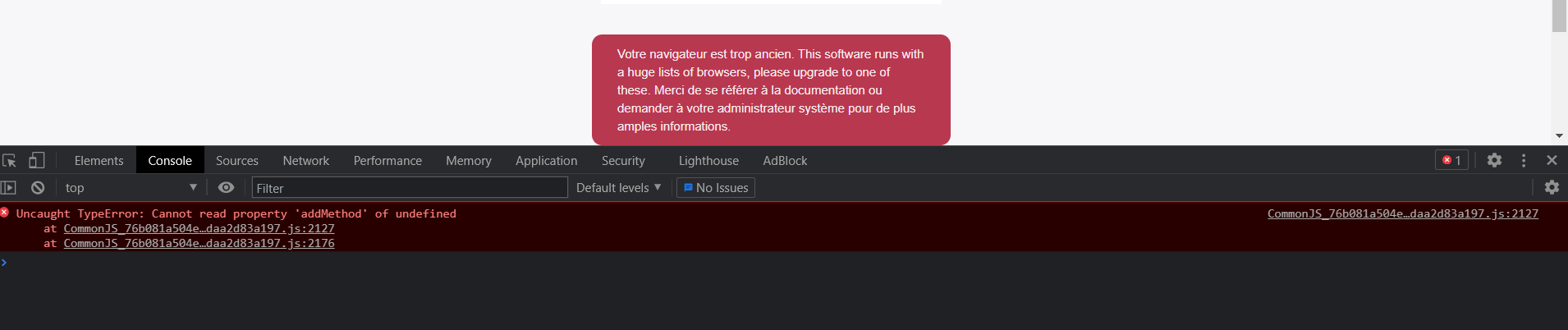
- some time after , I’m not able to log-in anymore because of this problem in the Agent AND Customer interface :

Could anyone help with this problem, I have not seen any errors in logs.
Tried to do :
su – otobo -c „cd ${OTOBO_BASE_DIR}/otobo; bin/otobo.Console.pl Maint::Config::Rebuild“
su – otobo -c „cd ${OTOBO_BASE_DIR}/otobo; bin/otobo.Console.pl Maint::Cache::Delete“but nothing help.
Regards,
Laurent
-
5. Mai 2021 um 9:36 Uhr #11463
Here is the error message associated in Console’s browser :
Uncaught TypeError: Cannot read property ‚addMethod‘ of undefined
at CommonJS_76b081a504e75dfab37badaa2d83a197.js:2127
at CommonJS_76b081a504e75dfab37badaa2d83a197.js:2176 -
5. Mai 2021 um 9:48 Uhr #11464
Hi Laurent,
this is most likely related to the update of jquery-validate. Have you installed a package which overwrites the Config-Option ‚Loader::Agent::CommonJS###000-Framework‘? If so it has to be updated to support jquery-validate-1.19.3.
If not, you probably changed said option by hand. You could either execute the following to reset this setting
su – otobo -c „cd ${OTOBO_BASE_DIR}/otobo; bin/otobo.Console.pl Admin::Config::Update --setting-name 'Loader::Agent::CommonJS###000-Framework' --reset“and then in the system look in the SysConfig-history to see what changed and possibly redo those changes. Or, the hacky way, you open up Kernel/Config/Files/ZZZAAuto.pm search for „validate“, set it to jquery-validate-1.19.3 and then (as this is only temporary!) change this setting in the web interface, too.
Also handy, while playing around are:
su – otobo -c „cd ${OTOBO_BASE_DIR}/otobo; bin/otobo.Console.pl Maint::Loader::CacheCleanup“And deleting the browser-cache. But this is more general info – for the above steps it is not necessary.
Hope it helps, Sven
-
5. Mai 2021 um 10:04 Uhr #11465
Hi Sven,
Thanks for quick and detailed reply.
I can confirm you’re totally right, this was the problem located at : Loader::Agent::CommonJS###000-Framework
I have changed the list or JS loaded to add one which allow to fill automatically the Bcc field with a default email address in Agent Answers, and so if I understand well, this parameter as i has been customized is not updated between versions, is there a way for Otobo to inform the user of this change or maybe have a way to do a diff between Default parameters between previous and newer version, so the user can be informed of all changes and apply them by hands then ?
Below is a diff between my config before (ZZZAAuto.pm_20210505) and after (ZZZAAuto.pm) the execution of the command to reset the value of Loader::Agent::CommonJS###000-Framework :
root@atlas:/opt/otobo/Kernel/Config/Files# diff ZZZAAuto.pm ZZZAAuto.pm_20210505
10c10
< $Self->{‚CurrentDeploymentID‘} = ’93‘;
—
> $Self->{‚CurrentDeploymentID‘} = ’92‘;
6089c6089
< ‚thirdparty/jquery-validate-1.19.3/jquery.validate.js‘,
—
> ‚thirdparty/jquery-validate-1.16.0/jquery.validate.js‘,
6130,6131c6130,6132
< ‚Core.UI.Elasticsearch.js‘,
< ‚Core.Agent.Responsive.js‘
—
> ‚Core.Agent.Responsive.js‘,
> ‚FillBcc.js‘,
> ‚Core.UI.Elasticsearch.js‘Thanks a lot for your answer and time.
Have a good day !
Regards,Laurent
-
-
5. Mai 2021 um 10:23 Uhr #11466
Yes, you are right that those settings won’t be updated if user specific changes were made. Usually we try to not make changes there at all between patches, but sometimes it is necessary (here e.g. this is a security update). Unfortunately to my knowledge there is no real functionality for your suggestion. In general some options like those general Loaders are better left untouched. If you are already fiddling with the source anyways, you could just provide a custom XML in Kernel/Config/Files/XML, where you copy this setting from the Framework.xml and name it e.g. „Loader::Agent::CommonJS###007-MyAdditions“ – everything there, will be loaded, too, after a Config::Rebuild. (And maybe you look for Loader::Module, because probably this is only needed in a few places, but that’s less important.)
But anyways, there are some changes we could do, to improve this situation, e.g. version numbers, imho are not really necessary in the paths of those packages. But this again is not something to change in a patch level update.
-
5. Mai 2021 um 10:52 Uhr #11467
Ok, thks a lot for your all these tips/informations.
Will remember of this modification for future upgrades ;)
Have a good day !
Regards,
Laurent
-
5. Mai 2021 um 11:03 Uhr #11468
Just a little last question :
We saw that in Personal Preferences / Miscellaneous under Skin we now have only Default available ?
Before we were able to choosed from Ivory / Ivory Slim / Default / Default Slim …Is it normal please ?
I do not see any informations on this on changelog :
https://otobo.io/de/release-note-otobo-10-0-10/Regards,
Laurent
-
5. Mai 2021 um 11:06 Uhr #11469
Hi Laurent,
this was just tidying. Those skins were the old OTRS skins and not functional with OTOBO, yet.
Best regards, Sven
-
-
AutorBeiträge


- Du musst angemeldet sein, um auf dieses Thema antworten zu können.