
Schlagwörter: imap auth basic oauth2 pop3oauth2
-
AutorBeiträge
-
-
13. Oktober 2022 um 18:10 Uhr - Views: 6304 #14013
Hi,
Today at around 16:00PM we started having issues with our OTOBO. It suddenly it stopped fetching emails.
Debugging the issue using this command
su -c „./otobo.Console.pl Maint::PostMaster::MailAccountFetch –debug“ -s /bin/bash otobothe following error appears:
Message: CommunicationLog(ID:32330,AccountType:-,AccountID:-,Direction:Incoming,Transport:Email,ObjectLogType:Connection,ObjectLogID:32678)::Kernel::System::MailAccount::IMAP => IMAPS: Auth for user support@example.com/outlook.office365.com failed!
Checking communication log from the OTOBO, we can see that the last successful fetch try was at 15:30
Additionally OTOBO version 10.0.15 (without docker) is the one we have. SMTP has been tested as well and it works without any issues (it is able to send mails). We are using Exchange Online.
Full debug log:
Spawning child process to fetch incoming messages from mail accounts…outlook.office365.com (IMAPS)…
[… cpan-lib/Net/IMAP/Simple.pm line 133 in sub _connect] connecting to outlook.office365.com:993
[… cpan-lib/Net/IMAP/Simple.pm line 133 in sub _connect] connected, returning socket
[… System/MailAccount/IMAPS.pm line 52 in sub new] waiting for socket ready
[… System/MailAccount/IMAPS.pm line 52 in sub new] looking for greeting
[… System/MailAccount/IMAPS.pm line 52 in sub new] got a greeting: * OK The Microsoft Exchange IMAP4 service is ready. [WgBSADAAUAAyADcAOABDAEEAMAAxADgANgAuAEMASABFAFAAMgA3ADgALgBQAFIATwBEAC4ATwBVAFQATABPAE8ASwAuAEMATwBNAA==]\r\n
[… cpan-lib/Net/IMAP/Simple.pm line 1251 in sub _send_cmd] 0 LOGIN support@example.com „89^nM&4K@x$df@W3″\r\n
[… cpan-lib/Net/IMAP/Simple.pm line 265 in sub _process_cmd] 0 NO LOGIN failed.\r\n
[… cpan-lib/Net/IMAP/Simple.pm line 1276 in sub _cmd_ok] 0 NO LOGIN failed.\r\n
[… cpan-lib/Net/IMAP/Simple.pm line 1191 in sub _seterrstr] LOGIN failed.\r
[… cpan-lib/Net/IMAP/Simple.pm line 879 in sub _send_cmd] 1 EXPUNGE\r\n
[… cpan-lib/Net/IMAP/Simple.pm line 1251 in sub _send_cmd] 2 LOGOUT\r\n
[… cpan-lib/Net/IMAP/Simple.pm line 881 in sub _process_cmd] 1 BAD Command received in Invalid state.\r\n
[… cpan-lib/Net/IMAP/Simple.pm line 1276 in sub _cmd_ok] 1 BAD Command received in Invalid state.\r\n
[… cpan-lib/Net/IMAP/Simple.pm line 1197 in sub _seterrstr] warning unknown return string (id=2): 1 BAD Command received in Invalid state.\r\n
[… cpan-lib/Net/IMAP/Simple.pm line 881 in sub _process_cmd] * BYE Microsoft Exchange Server IMAP4 server signing off.\r\n
[… cpan-lib/Net/IMAP/Simple.pm line 1276 in sub _cmd_ok] * BYE Microsoft Exchange Server IMAP4 server signing off.\r\n
[… cpan-lib/Net/IMAP/Simple.pm line 881 in sub _process_cmd] 2 OK LOGOUT completed.\r\n
[… cpan-lib/Net/IMAP/Simple.pm line 1276 in sub _cmd_ok] 2 OK LOGOUT completed.\r\n
ERROR: OTOBO-otobo.Console.pl-Maint::PostMaster::MailAccountFetch-23 Perl: 5.30.0 OS: linux Time: Thu Oct 13 15:40:10 2022Message: CommunicationLog(ID:32333,AccountType:-,AccountID:-,Direction:Incoming,Transport:Email,ObjectLogType:Connection,ObjectLogID:32681)::Kernel::System::MailAccount::IMAP => IMAPS: Auth for user support@example.com/outlook.office365.com failed!
Traceback (655390):
Module: Kernel::System::CommunicationLog::_LogError Line: 546
Module: Kernel::System::CommunicationLog::ObjectLog Line: 314
Module: Kernel::System::MailAccount::IMAP::_Fetch Line: 222
Module: Kernel::System::MailAccount::IMAP::Fetch Line: 109
Module: Kernel::System::MailAccount::MailAccountFetch Line: 574
Module: (eval) Line: 180
Module: Kernel::System::Console::Command::Maint::PostMaster::MailAccountFetch::Run Line: 172
Module: (eval) Line: 468
Module: Kernel::System::Console::BaseCommand::Execute Line: 462
Module: Kernel::System::Console::InterfaceConsole::Run Line: 88
Module: ./otobo.Console.pl Line: 35Done.
————————————————Any kind of help would be appreciated!
-
13. Oktober 2022 um 19:29 Uhr #14015
Hi Amar,
Microsoft disable the Basic Authentication step by step for IMAP4 or POP3:
https://otobo.io/en/oauth2-supersedes-microsoft-basic-authentication/
A tutorial to change the authentication mode is here:
I hope that helps!
Stefan
Team OTOBO
-
14. Oktober 2022 um 15:32 Uhr #14030
Hi Stefan,
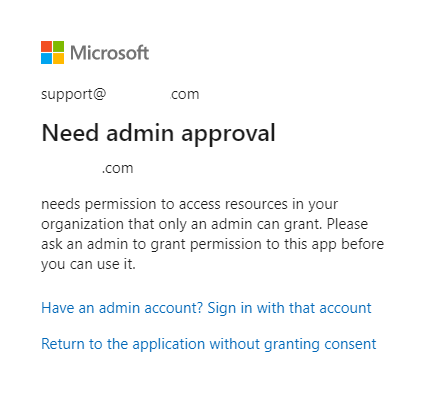
Thanks for the guide! I was able to follow it and set up all the needed apps, unfortunately when I change the authentication to IMAPOauth2 and I try to login to the MS page with the mailbox, this error appears:

What kind of permissions should I grant to my support account in AAD?
Thanks again for the help!
-
14. Oktober 2022 um 15:43 Uhr #14031
Just as an additional information, I have added my support user to the AAD enterprise application and app registrations. as well as assigned it the Cloud Application Administrator role
-
14. Oktober 2022 um 16:44 Uhr #14032
I have managed to fix this problem I think? But I have encounterend a different one. Whenever I try to login with the support email, this error appears:
Sorry, but we’re having trouble signing you in.
AADSTS500113: No reply address is registered for the application.
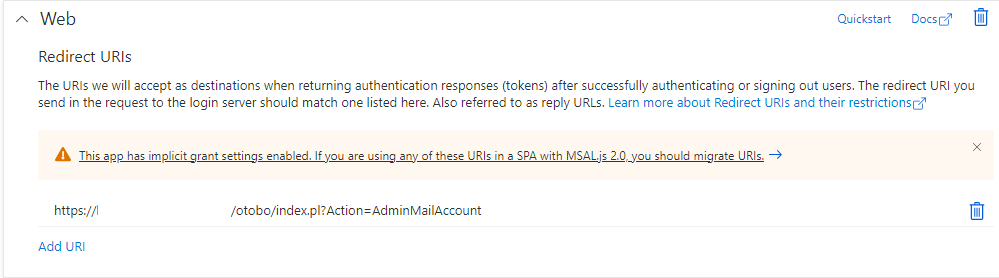
I double checked by redirect url configure in the AAD app and it is correct. If I copy paste the URL I entered it takes me to Mail Account Management page.
-
15. November 2022 um 18:52 Uhr #14265
Hi Amar,
did you solve the problem with the redirect URI? We have the same problem while switching to POP3OAuth2. We followed the OTOBO manual for the configuration and stuck here.
Kind regards
Ronald
-
9. Dezember 2022 um 13:58 Uhr #14399
We found out that we used the wrong App ID. After that we used the App ID showing in the overview of all Apps and this one was the correct one.
-
-
22. November 2022 um 11:30 Uhr #14294
Hello all,
I got a similar error when change IMAPS to oauth2. I am redirected to an O365 login page, and after that get this message:
AADSTS900971: No reply address provided.
I have confirmed thar Redirect URI is https://serverFQDN/otobo/index.pl?Action=AdminMailAccount and all configurations are according to Otobo manual.
Any idea about it?
Regards.
-
5. Dezember 2022 um 17:29 Uhr #14376
Same here, it seams something has changed between Microsoft and the guide.
Also we use shared mailbox but needed to add every user single as allowed user, who is able to read the shared mailbox, to step „The mailbox user must be assigned to the application. “ in the documentation and not only the shared mailbox user
Other options to bypass this error is written in this guide: https://docs.revenuegrid.com/ri/fast/articles/Need-Admin-Approval/
This together helped us bypass the „Admin Approval“ error, maybe the guide can be altered to add these steps
-
14. Dezember 2022 um 15:42 Uhr #14416
I have found other behaviour, if i use the application id of the registration in azure instead of the application id of the application it looks like it is working and accepting the login.
However after entering the details i am presented with my login screen of Otobo and after login the created mailbox isn’t added in the otobo configuration
-
2. Januar 2023 um 10:11 Uhr #14498
initial config. done according to OTOBO manual, but still we have error.
please provide solution for following error…
email : vinayak.k@alliance.edu.in
thank you in advance……
otobo@itsotrs:~$ /opt/otobo/bin/otobo.Console.pl Maint::PostMaster::MailAccountFetch –debug
Spawning child process to fetch incoming messages from mail accounts…
outlook.office365.com (IMAPOAuth2)…
Started at Mon Jan 2 08:49:41 2023
Using Mail::IMAPClient version 3.43 on perl 5.034000
Connecting with IO::Socket::IP PeerAddr outlook.office365.com PeerPort 143 Proto tcp Timeout 600 Debug 1
ERROR: Unable to connect to outlook.office365.com: at /usr/share/perl5/Mail/IMAPClient.pm line 377.
Mail::IMAPClient::connect(Mail::IMAPClient=HASH(0x56076580ebb0)) called at /usr/share/perl5/Mail/IMAPClient.pm l ine 315
Mail::IMAPClient::new(„Mail::IMAPClient“, „Server“, „outlook.office365.com“, „Starttls“, ARRAY(0x560766447ae8), „Debug“, 1, „Uid“, …) called at /opt/otobo/Kernel/System/MailAccount/IMAPOAuth2.pm line 75
Kernel::System::MailAccount::IMAPOAuth2::Connect(Kernel::System::MailAccount::IMAPOAuth2=HASH(0x560765a11010), “ ID“, 3, „Host“, „outlook.office365.com“, „Login“, „ticket.helpdesk\@alliance.edu.in“, „Password“, …) called at /opt/ot obo/Kernel/System/MailAccount/IMAPOAuth2.pm line 215
eval {…} called at /opt/otobo/Kernel/System/MailAccount/IMAPOAuth2.pm line 218
Kernel::System::MailAccount::IMAPOAuth2::_Fetch(Kernel::System::MailAccount::IMAPOAuth2=HASH(0x560765a11010), „T rusted“, 1, „Comment“, „Tickets“, „Debug“, 1, „QueueID“, …) called at /opt/otobo/Kernel/System/MailAccount/IMAPOAuth2. pm line 116
Kernel::System::MailAccount::IMAPOAuth2::Fetch(Kernel::System::MailAccount::IMAPOAuth2=HASH(0x560765a11010), „Qu eueID“, 0, „ID“, 3, „UserID“, 1, „Host“, …) called at /opt/otobo/Custom/Kernel/System/MailAccount.pm line 654
Kernel::System::MailAccount::MailAccountFetch(Kernel::System::MailAccount=HASH(0x5607658f9030), „DispatchingBy“, „From“, „CreateTime“, „2022********12********31 04:03:36“, „ChangeTime“, „2022********12********31 04:17:11“, „ValidID“ , …) called at /opt/otobo/Kernel/System/Console/Command/Maint/PostMaster/MailAccountFetch.pm line 180
eval {…} called at /opt/otobo/Kernel/System/Console/Command/Maint/PostMaster/MailAccountFetch.pm line 172
Kernel::System::Console::Command::Maint::PostMaster::MailAccountFetch::Run(Kernel::System::Console::Command::Mai nt::PostMaster::MailAccountFetch=HASH(0x560764df38a0)) called at /opt/otobo/Kernel/System/Console/BaseCommand.pm line 48 0
eval {…} called at /opt/otobo/Kernel/System/Console/BaseCommand.pm line 474
Kernel::System::Console::BaseCommand::Execute(Kernel::System::Console::Command::Maint::PostMaster::MailAccountFe tch=HASH(0x560764df38a0), „****************debug“) called at /opt/otobo/Kernel/System/Console/InterfaceConsole.pm line 8 8
Kernel::System::Console::InterfaceConsole::Run(Kernel::System::Console::InterfaceConsole=HASH(0x560764de5c10), “ Maint::PostMaster::MailAccountFetch“, „****************debug“) called at /opt/otobo/bin/otobo.Console.pl line 35
ERROR: OTOBO********otobo.Console.pl********Maint::PostMaster::MailAccountFetch********42 Perl: 5.34.0 OS: linux Time: M on Jan 2 08:58:24 2023Message: CommunicationLog(ID:3380,AccountType:********,AccountID:********,Direction:Incoming,Transport:Email,ObjectLogT ype:Connection,ObjectLogID:3380)::Kernel::System::MailAccount::IMAPOAuth2 => Something went wrong while trying to connec t to ‚IMAPOAuth2 => ticket.helpdesk@alliance.edu.in/outlook.office365.com‘: Can’t call method „authenticate“ on an undef ined value at /opt/otobo/Kernel/System/MailAccount/IMAPOAuth2.pm line 83.
Traceback (23050):
Module: Kernel::System::CommunicationLog::_LogError Line: 546
Module: Kernel::System::CommunicationLog::ObjectLog Line: 314
Module: Kernel::System::MailAccount::IMAPOAuth2::_Fetch Line: 233
Module: Kernel::System::MailAccount::IMAPOAuth2::Fetch Line: 116
Module: Kernel::System::MailAccount::MailAccountFetch Line: 654
Module: (eval) Line: 180
Module: Kernel::System::Console::Command::Maint::PostMaster::MailAccountFetch::Run Line: 172
Module: (eval) Line: 480
Module: Kernel::System::Console::BaseCommand::Execute Line: 474
Module: Kernel::System::Console::InterfaceConsole::Run Line: 88
Module: /opt/otobo/bin/otobo.Console.pl Line: 35Done.
-
26. Januar 2023 um 16:03 Uhr #14621
Hi everyone,
Sorry for replying to this thread late, I have totally forgot that I have created a question for this.
We did manage to set up the AAD and succesfully authenticate the mail user.
You may follow the guide from this doc:
https://doc.otobo.org/manual/admin/10.1/en/content/communication-notifications/postmaster-mail-accounts.html#pop3-and-imap-oauth2-authentificationbut, there is no need for all the steps in Azure that are provided in the article. You only need to create one app registration, no need for the enterprise application. Once you create the app registration, just assign the user to the application. I have additionally added the offline_access permission for the user as well.
With this, you can continue with the OTOBO part of the article (OTOBO OAuth2 Configuration)
-
29. Januar 2023 um 10:40 Uhr #14625
Hi,
Has anyone able to resolve the „AADSTS900971: No reply address provided.“. Although, I have provide and verified that redirect address is correct.
any help will be much appreciated.
-
29. Januar 2023 um 10:51 Uhr #14626
Got it working. The issue was the application ID was different that what was state in the step „The mailbox user must be assigned to the application“
-
-
1. Februar 2023 um 15:24 Uhr #14637
The application id needs to be the ID of the registration AND NOT of the Application itself, this isn’t clear from the guide
-
1. Februar 2023 um 16:06 Uhr #14638
i still have issue that after successfull login to the microsoft part i am redirected to the otobo login page which i authenticate using my admin account
After logging in into otobo the oauth2 registration isn’t available or saved as a mailbox.
I try to find the logfile(s) but have no clue where the logs are saved, we use the docker version and have no clue what to do next
-
-
AutorBeiträge




- Du musst angemeldet sein, um auf dieses Thema antworten zu können.