
Schlagwörter: accessibility, blind, screen reader
-
AutorBeiträge
-
-
20. Juli 2023 um 14:33 Uhr - Views: 768 #15429
Hi
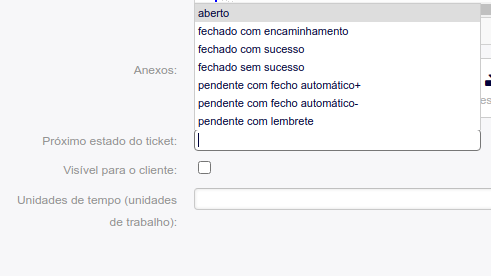
Recently a colleague has started using Otobo at our University. Still, it has some issues with using the dropdown that is recognized as a search field (that filters the available entries).
He referred to replying to a ticket; it’s impossible to read the options on the ticket state using the screen reader.
Is there some configuration that we can do, or another theme that is more screen reader friendly?
-
21. Juli 2023 um 13:56 Uhr #15430
Hi Miguel,
We hope you are well.
Is he accessing the system via the agent frontend (/otobo/index.pl) or via the customer frontend (/otobo/customer.pl?)
Do you also have some more information for us? Which screen reader setup is he using? And could you show us an example configuration of the dynamic field?
And what exactly doesn’t work? Is the voice not telling all the values that are possible to select from? Does it happen only if you typed something or also if you just click to open it?Maybe you could help us out with some clarification.
Cheers
Stefan -
21. Juli 2023 um 14:10 Uhr #15431
Hi
Thank you for your reply, is via the agent frontend; we’ve tried the MacOS screen reader the voice doesn’t tell the values from this kind of fields:

Thank you in advance.
-
21. September 2023 um 15:08 Uhr #15648
Hi.
Is there any update on this topic? Because it something that will be demanding by the EU new approved law by The Digital Services Act.
-
12. Dezember 2023 um 16:13 Uhr #29780
Hi.
Sorry to bother, is there any update on this?
Thank you in advance.
-
12. Dezember 2023 um 16:34 Uhr #29781
Dear Miguel,
Please excuse the late reply.
I can only report from my experience, I had two employees at OTRS who were disabled and worked with Screenreeder and OTRS (the predecessor of OTOBO) without any problems. However, this was really hardware with a Brail line.
Under Admin -> System configuration there is an Option with the name: „ModerniseFormFields“. If you change this, will the content be „displayed“ correctly?
If so, we would still like to fix the error. Would it be possible for your university to sign a support contract https://otobo.io/en/support/ with us, then we could have the case officially investigated. It’s always a bit difficult and takes a bit longer this way, as we want to make OTOBO and all packages available free of charge.
Without a support contract, I would ask you to narrow down and describe the error as much as possible and create an issue at https://github.com/RotherOSS/otobo/issues. Above all, further information on reproducibility would be important. Then we can reproduce it and initiate the next steps.
I hope I could help!
Best regards from Germany,
Stefan
-
20. Dezember 2023 um 13:26 Uhr #29799
Hi
Thank you for your reply, we already have feedback from our colleague:
„With the changes, it is now perfectly accessible to access the settings and change them successfully. In general, everything is accessible. There is only one problem that ends up making it impossible to use. When responding to a ticket, in the frame that opens, it is possible to read; the cursor moves well through the existing text, but the screen reader does not activate the cursor for writing. That is, I cannot write. I have already tested it with Safari, the browser I use by default, and with Edge. The behavior is the same. I suppose the problem is that this content opens in a Frame.
As I don’t like to give up… I explored this problem again… I will try to explain, using the screen reader and moving with Tab I go through the various options of the message. The Respond option opens a menu with two options. As I could not click on the sub-option response, I could only read the frame’s content. When selecting „Reply“ in that submenu, an error appears, indicating that the browser has blocked a pop-up window. The information is that some application has blocked the opening of pop-up windows. Maybe it’s some blocker that I have in Safari. I will investigate what is happening and return when I have some conclusion.”
-
-
AutorBeiträge



- Du musst angemeldet sein, um auf dieses Thema antworten zu können.