
-
AutorBeiträge
-
-
21. Oktober 2024 um 11:04 Uhr - Views: 725 #32476
Moin, bis jetzt hatten wir nur LDAP als Backend für Kundenbenutzer, jetzt habe ich noch ein Datenbank Backend hinzugefügt, damit wir einzelne Benutzer auch manuell hinzufügen können.
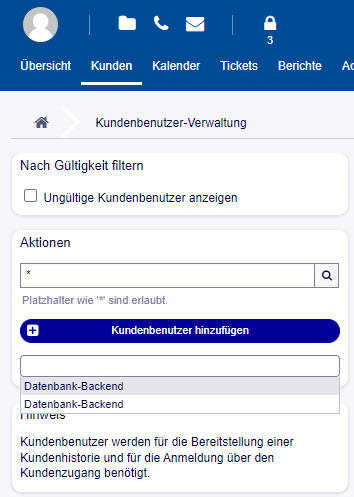
Komischerweise werden zwei Datenbank-Backends angezeigt, die sich auch unterschiedlichen verhalten: Wenn ich z.B. Vorname als Pflichtfeld in der Config rausnehme, wirkt sich das nur auf eines der Datenbank Backends aus.

Hier der entsprechende Teile aus der Config:
# CustomerUser
# (customer user ldap backend and settings)
$Self->{CustomerUser1} = {
Name => 'LDAP Backend',
Module => 'Kernel::System::CustomerUser::LDAP',
Params => {
# ldap host
Host => '***',
# ldap base dn
BaseDN => '***',
# search scope (one|sub)
SSCOPE => 'sub',
# The following is valid but would only be necessary if the
# anonymous user does NOT have permission to read from the LDAP tree
UserDN => '***',
UserPw => '***',
# in case you want to add always one filter to each ldap query, use
# this option. e. g. AlwaysFilter => '(mail=*)' or AlwaysFilter => '(objectclass=user)'
AlwaysFilter => '',
# if the charset of your ldap server is iso-8859-1, use this:
# SourceCharset => 'iso-8859-1',
SourceCharset => 'utf-8',
DestCharset => 'utf-8',
# die if backend can't work, e. g. can't connect to server
Die => 0,
# Net::LDAP new params (if needed - for more info see perldoc Net::LDAP)
Params => {
port => 389,
timeout => 120,
async => 0,
version => 3,
},
},
# customer unique id
CustomerKey => 'mail',
# customer #
CustomerID => 'mail',
CustomerUserListFields => ['cn', 'mail'],
CustomerUserSearchFields => ['sAMAccountName', 'cn', 'mail'],
CustomerUserSearchPrefix => '',
CustomerUserSearchSuffix => '*',
CustomerUserSearchListLimit => 250,
CustomerUserPostMasterSearchFields => ['mail'],
CustomerUserNameFields => ['givenname', 'sn'],
# Configures the character for joining customer user name parts. Join single space if it is not defined.
CustomerUserNameFieldsJoin => ' ',
# show customer user and customer tickets in customer interface
CustomerUserExcludePrimaryCustomerID => 0,
# add a ldap filter for valid users (expert setting)
# CustomerUserValidFilter => '(!(description=gesperrt))',
# admin can't change customer preferences
AdminSetPreferences => 0,
# cache time to live in sec. - cache any ldap queries
# CacheTTL => 0,
Map => [
# note: Login, Email and CustomerID needed!
# var, frontend, storage, shown (1=always,2=lite), required, storage-type, http-link, readonly, http-link-target, link class(es)
[ 'UserTitle', Translatable('Title'), 'title', 1, 0, 'var', '', 1, undef, undef ],
[ 'UserFirstname', Translatable('Firstname'), 'givenname', 1, 1, 'var', '', 1, undef, undef ],
[ 'UserLastname', Translatable('Lastname'), 'sn', 1, 1, 'var', '', 1, undef, undef ],
[ 'UserLogin', Translatable('Username'), 'mail', 1, 1, 'var', '', 1, undef, undef ],
[ 'UserEmail', Translatable('Email'), 'mail', 1, 1, 'var', '', 1, undef, undef ],
[ 'UserCustomerID', Translatable('CustomerID'), 'mail', 0, 1, 'var', '', 1, undef, undef ],
# [ 'UserCustomerIDs', Translatable('CustomerIDs'), 'second_customer_ids', 1, 0, 'var', '', 1, undef, undef ],
[ 'UserPhone', Translatable('Phone'), 'telephonenumber', 1, 0, 'var', 'tel:[% Data.Value %]', 1, 'undef', undef ],
[ 'UserMobile', Translatable('Mobile'), 'mobile', 1, 0, 'var', 'tel:[% Data.Value %]', 1, 'undef', undef ],
[ 'UserAddress', Translatable('Address'), 'streetaddress', 1, 0, 'var', '', 1, undef, undef ],
[ 'UserComment', Translatable('Comment'), 'description', 1, 0, 'var', '', 1, undef, undef ],
[ 'UserKostenstelle','Kostenstelle', 'employeeID', 1, 0, 'var', '', 1, undef, undef ],# this is needed, if "SMIME::FetchFromCustomer" is active
# [ 'UserSMIMECertificate', 'SMIMECertificate', 'userSMIMECertificate', 0, 1, 'var', '', 1, undef, undef ],# Dynamic field example
# [ 'DynamicField_Name_X', undef, 'Name_X', 0, 0, 'dynamic_field', undef, 0, undef, undef ],
],
};# CustomerUser
# (customer user database backend and settings)
$Self->{CustomerUser2} = {
Name => Translatable('Database Backend'),
Module => 'Kernel::System::CustomerUser::DB',
Params => {# if you want to use an external database, add the
# required settings
# DSN => 'DBI:odbc:yourdsn',
# Type => 'mssql', # only for ODBC connections
# DSN => 'DBI:mysql:database=customerdb;host=customerdbhost',
# User => '',
# Password => '',
Table => 'customer_user',
# ForeignDB => 0, # set this to 1 if your table does not have create_time, create_by, change_time and change_by fields# CaseSensitive defines if the data storage of your DBMS is case sensitive and will be
# preconfigured within the database driver by default.
# If the collation of your data storage differs from the default settings,
# you can set the current behavior ( either 1 = CaseSensitive or 0 = CaseINSensitive )
# to fit your environment.
#
# CaseSensitive => 0,# SearchCaseSensitive will control if the searches within the data storage are performed
# case sensitively (if possible) or not. Change this option to 1, if you want to search case sensitive.
# This can improve the performance dramatically on large databases.
SearchCaseSensitive => 0,
},# customer unique id
CustomerKey => 'login',# customer #
CustomerID => 'customer_id',
CustomerValid => 'valid_id',# The last field must always be the email address so that a valid
# email address like "John Doe" <john.doe@domain.com> can be constructed from the fields.
CustomerUserListFields => [ 'first_name', 'last_name', 'email' ],# CustomerUserListFields => ['login', 'first_name', 'last_name', 'customer_id', 'email'],
CustomerUserSearchFields => [ 'login', 'first_name', 'last_name', 'customer_id' ],
CustomerUserSearchPrefix => '*',
CustomerUserSearchSuffix => '*',
CustomerUserSearchListLimit => 250,
CustomerUserPostMasterSearchFields => ['email'],
CustomerUserNameFields => [ 'title', 'first_name', 'last_name' ],
CustomerUserEmailUniqCheck => 1,# # Configures the character for joining customer user name parts. Join single space if it is not defined.
# # CustomerUserNameFieldsJoin => '',# # show now own tickets in customer panel, CompanyTickets
# CustomerUserExcludePrimaryCustomerID => 0,
# # generate auto logins
# AutoLoginCreation => 0,
# # generate auto login prefix
# AutoLoginCreationPrefix => 'auto',
# # admin can change customer preferences
# AdminSetPreferences => 1,
# use customer company support (reference to company, See CustomerCompany settings)
CustomerCompanySupport => 1,
# cache time to live in sec. - cache any database queries
CacheTTL => 60 * 60 * 24,
# # Consider this source read only.
# ReadOnly => 1,
Map => [# Info about dynamic fields:
#
# Dynamic Fields of type CustomerUser can be used within the mapping (see example below).
# The given storage (third column) then can also be used within the following configurations (see above):
# CustomerUserSearchFields, CustomerUserPostMasterSearchFields, CustomerUserListFields, CustomerUserNameFields
#
# Note that the columns 'frontend' and 'readonly' will be ignored for dynamic fields.# note: Login, Email and CustomerID needed!
# var, frontend, storage, shown (1=always,2=lite), required, storage-type, http-link, readonly, http-link-target, link class(es)
[ 'UserTitle', Translatable('Title or salutation'), 'title', 1, 0, 'var', '', 0, undef, undef ],
[ 'UserFirstname', Translatable('Firstname'), 'first_name', 1, 0, 'var', '', 0, undef, undef ],
[ 'UserLastname', Translatable('Lastname'), 'last_name', 1, 1, 'var', '', 0, undef, undef ],
[ 'UserLogin', Translatable('Username'), 'login', 1, 1, 'var', '', 0, undef, undef ],
[ 'UserPassword', Translatable('Password'), 'pw', 0, 0, 'var', '', 0, undef, undef ],
[ 'UserEmail', Translatable('Email'), 'email', 1, 1, 'var', '', 0, undef, undef ],
# [ 'UserEmail', Translatable('Email'), 'email', 1, 1, 'var', '[% Env("CGIHandle") %]?Action=AgentTicketCompose;ResponseID=1;TicketID=[% Data.TicketID | uri %];ArticleID=[% Data.ArticleID | uri %]', 0, '', 'AsPopup OTOBOPopup_TicketAction' ],
[ 'UserCustomerID', Translatable('CustomerID'), 'customer_id', 0, 1, 'var', '', 0, undef, undef ],
# [ 'UserCustomerIDs', Translatable('CustomerIDs'), 'customer_ids', 1, 0, 'var', '', 0, undef, undef ],
[ 'UserPhone', Translatable('Phone'), 'phone', 1, 0, 'var', '', 0, undef, undef ],
[ 'UserFax', Translatable('Fax'), 'fax', 1, 0, 'var', '', 0, undef, undef ],
[ 'UserMobile', Translatable('Mobile'), 'mobile', 1, 0, 'var', '', 0, undef, undef ],
[ 'UserStreet', Translatable('Street'), 'street', 1, 0, 'var', '', 0, undef, undef ],
[ 'UserZip', Translatable('Zip'), 'zip', 1, 0, 'var', '', 0, undef, undef ],
[ 'UserCity', Translatable('City'), 'city', 1, 0, 'var', '', 0, undef, undef ],
[ 'UserCountry', Translatable('Country'), 'country', 1, 0, 'var', '', 0, undef, undef ],
[ 'UserComment', Translatable('Comment'), 'comments', 1, 0, 'var', '', 0, undef, undef ],
[ 'ValidID', Translatable('Valid'), 'valid_id', 0, 1, 'int', '', 0, undef, undef ],# Dynamic field example
# [ 'DynamicField_Name_X', undef, 'Name_X', 0, 0, 'dynamic_field', undef, 0, undef, undef ],
],# default selections
Selections => {# UserTitle => {
# 'Mr.' => Translatable('Mr.'),
# 'Mrs.' => Translatable('Mrs.'),
# },
},
};
-
-
AutorBeiträge

- Du musst angemeldet sein, um auf dieses Thema antworten zu können.