
Schlagwörter: imap
-
AutorBeiträge
-
-
17. Juli 2023 um 12:11 Uhr - Views: 2189 #15406
Hi,
This morning we started having issues with our IMAP. We kept receiving mail notifications like this:
Subject: OTOBO Scheduler Daemon Cron: MailAccountFetch
Error: Timeout of 600 seconds reached, killing child process!Manually executing „su -c „./otobo.Console.pl Maint::PostMaster::MailAccountFetch –debug“ -s /bin/bash otobo“ we got two problems:
– We either got an error log that said that a process like that is already running in the database
– The execution of the script got stuck and after some time this error appeared:Short version:
Something went wrong while trying to connect to ‚IMAPOAuth2 => support@domain.com/outlook.office365.com‘: Can’t call method „authenticate“ on an undefined value at /opt/otobo/Kernel/System/MailAccount/IMAPOAuth2.pm line 83.Long version of error:
Using Mail::IMAPClient version 3.42 on perl 5.030000
Connecting with IO::Socket::IP PeerAddr outlook.office365.com PeerPort 143 Proto tcp Timeout 600 Debug 1
Connected to outlook.office365.com
Read: * OK The Microsoft Exchange IMAP4 service is ready. [WgBSAEEAUAAyADcAOABDAEEAMAAwADAANAAuAEMASABFAFAAMgA3ADgALgBQAFIATwBEAC4ATwBVAFQATABPAE8ASwAuAEMATwBNAA==]
Sending: 1 STARTTLS
Sent 12 bytes
ERROR: timeout waiting 600s for data from server at /usr/share/perl5/Mail/IMAPClient.pm line 1893.
Mail::IMAPClient::__read_more(Mail::IMAPClient=HASH(0x557569b6beb0), IO::Socket::IP=GLOB(0x55756a5e1230), 600) called at /usr/share/perl5/Mail/IMAPClient.pm line 1859
Mail::IMAPClient::_read_more(Mail::IMAPClient=HASH(0x557569b6beb0), IO::Socket::IP=GLOB(0x55756a5e1230), 600) called at /usr/share/perl5/Mail/IMAPClient.pm line 1670
Mail::IMAPClient::_read_line(Mail::IMAPClient=HASH(0x557569b6beb0)) called at /usr/share/perl5/Mail/IMAPClient.pm line 1406
Mail::IMAPClient::_get_response(Mail::IMAPClient=HASH(0x557569b6beb0), 1, undef) called at /usr/share/perl5/Mail/IMAPClient.pm line 1340
Mail::IMAPClient::_imap_command_do(Mail::IMAPClient=HASH(0x557569b6beb0), "STARTTLS") called at /usr/share/perl5/Mail/IMAPClient.pm line 1238
Mail::IMAPClient::_imap_command(Mail::IMAPClient=HASH(0x557569b6beb0), "STARTTLS") called at /usr/share/perl5/Mail/IMAPClient.pm line 443
Mail::IMAPClient::starttls(Mail::IMAPClient=HASH(0x557569b6beb0)) called at /usr/share/perl5/Mail/IMAPClient.pm line 420
Mail::IMAPClient::Socket(Mail::IMAPClient=HASH(0x557569b6beb0), IO::Socket::IP=GLOB(0x55756a5e1230)) called at /usr/share/perl5/Mail/IMAPClient.pm line 369
Mail::IMAPClient::connect(Mail::IMAPClient=HASH(0x557569b6beb0)) called at /usr/share/perl5/Mail/IMAPClient.pm line 315
Mail::IMAPClient::new("Mail::IMAPClient", "Server", "outlook.office365.com", "Starttls", ARRAY(0x557569bb72b0), "Debug", 1, "Uid", ...) called at /opt/otobo/Kernel/System/MailAccount/IMAPOAuth2.pm line 75
Kernel::System::MailAccount::IMAPOAuth2::Connect(Kernel::System::MailAccount::IMAPOAuth2=HASH(0x557569030048), "ID", 1, "Host", "outlook.office365.com", "Login", "support\@domain.com", "Password", ...) called at /opt/otobo/Kernel/System/MailAccount/IMAPOAuth2.pm line 215
eval {...} called at /opt/otobo/Kernel/System/MailAccount/IMAPOAuth2.pm line 218
Kernel::System::MailAccount::IMAPOAuth2::_Fetch(Kernel::System::MailAccount::IMAPOAuth2=HASH(0x557569030048), "ValidID", 1, "UserID", 1, "DispatchingBy", "From", "QueueID", ...) called at /opt/otobo/Kernel/System/MailAccount/IMAPOAuth2.pm line 116
Kernel::System::MailAccount::IMAPOAuth2::Fetch(Kernel::System::MailAccount::IMAPOAuth2=HASH(0x557569030048), "Type", "IMAPOAuth2", "CMD", 1, "Comment", "", "ValidID", ...) called at /opt/otobo/Custom/Kernel/System/MailAccount.pm line 654
Kernel::System::MailAccount::MailAccountFetch(Kernel::System::MailAccount=HASH(0x557568f0c2a0), "Comment", "", "Type", "IMAPOAuth2", "Profile", "Custom1", "Password", ...) called at /opt/otobo/Kernel/System/Console/Command/Maint/PostMaster/MailAccountFetch.pm line 180
eval {...} called at /opt/otobo/Kernel/System/Console/Command/Maint/PostMaster/MailAccountFetch.pm line 172
Kernel::System::Console::Command::Maint::PostMaster::MailAccountFetch::Run(Kernel::System::Console::Command::Maint::PostMaster::MailAccountFetch=HASH(0x5575684d5510)) called at /opt/otobo/Kernel/System/Console/BaseCommand.pm line 468
eval {...} called at /opt/otobo/Kernel/System/Console/BaseCommand.pm line 462
Kernel::System::Console::BaseCommand::Execute(Kernel::System::Console::Command::Maint::PostMaster::MailAccountFetch=HASH(0x5575684d5510), "****************timeout", 1200, "****************force********pid", "****************debug") called at /opt/otobo/Kernel/System/Console/InterfaceConsole.pm line 88
Kernel::System::Console::InterfaceConsole::Run(Kernel::System::Console::InterfaceConsole=HASH(0x5575684b8108), "Maint::PostMaster::MailAccountFetch", "****************timeout", 1200, "****************force********pid", "****************debug") called at ./otobo.Console.pl line 35
ERROR: timeout waiting 600s for data from server at /usr/share/perl5/Mail/IMAPClient.pm line 1288.
Mail::IMAPClient::_imap_command(Mail::IMAPClient=HASH(0x557569b6beb0), "STARTTLS") called at /usr/share/perl5/Mail/IMAPClient.pm line 443
Mail::IMAPClient::starttls(Mail::IMAPClient=HASH(0x557569b6beb0)) called at /usr/share/perl5/Mail/IMAPClient.pm line 420
Mail::IMAPClient::Socket(Mail::IMAPClient=HASH(0x557569b6beb0), IO::Socket::IP=GLOB(0x55756a5e1230)) called at /usr/share/perl5/Mail/IMAPClient.pm line 369
Mail::IMAPClient::connect(Mail::IMAPClient=HASH(0x557569b6beb0)) called at /usr/share/perl5/Mail/IMAPClient.pm line 315
Mail::IMAPClient::new("Mail::IMAPClient", "Server", "outlook.office365.com", "Starttls", ARRAY(0x557569bb72b0), "Debug", 1, "Uid", ...) called at /opt/otobo/Kernel/System/MailAccount/IMAPOAuth2.pm line 75
Kernel::System::MailAccount::IMAPOAuth2::Connect(Kernel::System::MailAccount::IMAPOAuth2=HASH(0x557569030048), "ID", 1, "Host", "outlook.office365.com", "Login", "support\@domain.com", "Password", ...) called at /opt/otobo/Kernel/System/MailAccount/IMAPOAuth2.pm line 215
eval {...} called at /opt/otobo/Kernel/System/MailAccount/IMAPOAuth2.pm line 218
Kernel::System::MailAccount::IMAPOAuth2::_Fetch(Kernel::System::MailAccount::IMAPOAuth2=HASH(0x557569030048), "ValidID", 1, "UserID", 1, "DispatchingBy", "From", "QueueID", ...) called at /opt/otobo/Kernel/System/MailAccount/IMAPOAuth2.pm line 116
Kernel::System::MailAccount::IMAPOAuth2::Fetch(Kernel::System::MailAccount::IMAPOAuth2=HASH(0x557569030048), "Type", "IMAPOAuth2", "CMD", 1, "Comment", "", "ValidID", ...) called at /opt/otobo/Custom/Kernel/System/MailAccount.pm line 654
Kernel::System::MailAccount::MailAccountFetch(Kernel::System::MailAccount=HASH(0x557568f0c2a0), "Comment", "", "Type", "IMAPOAuth2", "Profile", "Custom1", "Password", ...) called at /opt/otobo/Kernel/System/Console/Command/Maint/PostMaster/MailAccountFetch.pm line 180
eval {...} called at /opt/otobo/Kernel/System/Console/Command/Maint/PostMaster/MailAccountFetch.pm line 172
Kernel::System::Console::Command::Maint::PostMaster::MailAccountFetch::Run(Kernel::System::Console::Command::Maint::PostMaster::MailAccountFetch=HASH(0x5575684d5510)) called at /opt/otobo/Kernel/System/Console/BaseCommand.pm line 468
eval {...} called at /opt/otobo/Kernel/System/Console/BaseCommand.pm line 462
Kernel::System::Console::BaseCommand::Execute(Kernel::System::Console::Command::Maint::PostMaster::MailAccountFetch=HASH(0x5575684d5510), "****************timeout", 1200, "****************force********pid", "****************debug") called at /opt/otobo/Kernel/System/Console/InterfaceConsole.pm line 88
Kernel::System::Console::InterfaceConsole::Run(Kernel::System::Console::InterfaceConsole=HASH(0x5575684b8108), "Maint::PostMaster::MailAccountFetch", "****************timeout", 1200, "****************force********pid", "****************debug") called at ./otobo.Console.pl line 35
ERROR: OTOBO********otobo.Console.pl********Maint::PostMaster::MailAccountFetch********23 Perl: 5.30.0 OS: linux Time: Mon Jul 17 08:59:15 2023Message: CommunicationLog(ID:75174,AccountType:********,AccountID:********,Direction:Incoming,Transport:Email,ObjectLogType:Connection,ObjectLogID:79085)::Kernel::System::MailAccount::IMAPOAuth2 => Something went wrong while trying to connect to 'IMAPOAuth2 => support@domain.com/outlook.office365.com': Can't call method "authenticate" on an undefined value at /opt/otobo/Kernel/System/MailAccount/IMAPOAuth2.pm line 83.Traceback (2912):
Module: Kernel::System::CommunicationLog::_LogError Line: 546
Module: Kernel::System::CommunicationLog::ObjectLog Line: 314
Module: Kernel::System::MailAccount::IMAPOAuth2::_Fetch Line: 233
Module: Kernel::System::MailAccount::IMAPOAuth2::Fetch Line: 116
Module: Kernel::System::MailAccount::MailAccountFetch Line: 654
Module: (eval) Line: 180
Module: Kernel::System::Console::Command::Maint::PostMaster::MailAccountFetch::Run Line: 172
Module: (eval) Line: 468
Module: Kernel::System::Console::BaseCommand::Execute Line: 462
Module: Kernel::System::Console::InterfaceConsole::Run Line: 88
Module: ./otobo.Console.pl Line: 35The OTOBO is running on an Ubuntu 20.04 server and OTOBO version is 10.0.15
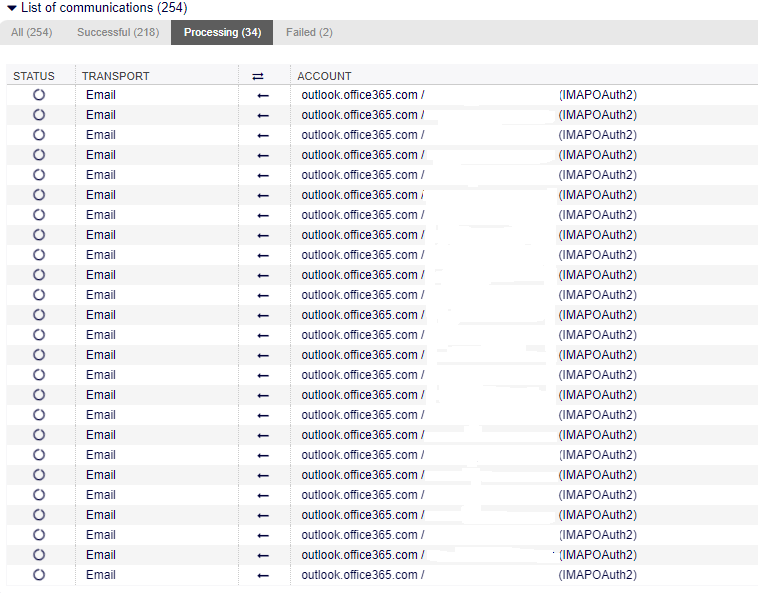
We are using Exchange Online and have set up the needed AAD app registration for our support mail user to get authenticated, this was working all fine till this morning. As a workaround, we have switched to POP3 instead of IMAP and that seems to be working fine for now. My question is how can we fix the IMAP getting stuck and are the following IMAP processes (the one shown in the picture – screenshot from Communication Log) still open/running, if so how can we kill them safely?

Additionally, SELECT * FROM process_id and SELECT * FROM scheduler_task return 0 rows.
Best Regards,
Amar -
17. Juli 2023 um 13:38 Uhr #15408
Hi Amar,
a few weeks ago, some users had the same problem.
For OTOBO, please run the following Linux command per putty or other terminal client:
sed -i ’s/Starttls => \[ SSL_verify_mode => 0 \],/Ssl => 1,/‘ /opt/otobo/Kernel/System/MailAccount/IMAPOAuth2.pm
And backup the file before update :)
https://otobo.io/de/forums/topic/imap-verbindung-zu-m365-mit-oauth2-nicht-mehr-moeglich/
I hope this helps you.
KR,
Marcel
-
17. Juli 2023 um 14:05 Uhr #15411
Hi Marcel,
I can confirm that the sed commands from the second link you mentioned in your reply do work.
Thanks a lot for the help!
Best Regards,
Amar
-
-
AutorBeiträge


- Du musst angemeldet sein, um auf dieses Thema antworten zu können.