
Schlagwörter: #DaemonSheduler #otobocron #otobonotifications #EscalationCheck #SchedulerDaemonCronEscalationCheck
-
AutorBeiträge
-
-
12. September 2022 um 12:21 Uhr - Views: 1992 #13689
Hello Team,
I keep getting repetitive emails with subject
OTOBO Scheduler Daemon Cron: EscalationCheckand they are too many. An average of 6 emails per minute and even though the tickets are resolved but still the emails keep coming.Also here is the sample ticket created, I cannot make up anything with this email.
I tried checking each line in the backend code, but I found it is Perl Source Code which I am not familiar with.
ERROR: OTOBO-otobo.Console.pl-Maint::Ticket::EscalationCheck-30 Perl: 5.32.1 OS: linux
Time: Mon Sep 12 08:50:20 2022Message: No TypeID for 2 found!Traceback (89604):
Module: Kernel::System::Type::TypeLookup Line: 429
Module: Kernel::System::Ticket::TicketGet Line: 1392
Module: Kernel::System::Console::Command::Maint::Ticket::EscalationCheck::Run Line: 109
Module: (eval) Line: 468
Module: Kernel::System::Console::BaseCommand::Execute Line: 462
Module: (eval) Line: 152
Module: Kernel::System::Daemon::DaemonModules::SchedulerTaskWorker::Cron::Run Line: 131
Module: Kernel::System::Daemon::DaemonModules::SchedulerTaskWorker::Run Line: 243
Module: (eval) Line: 385
Module: main::Start Line: 385
Module: bin/otobo.Daemon.pl Line: 164ERROR: OTOBO-otobo.Console.pl-Maint::Ticket::EscalationCheck-30 Perl: 5.32.1 OS: linux
Time: Mon Sep 12 08:50:21 2022Message: No TypeID for 4 found!Traceback (89604):
Module: Kernel::System::Type::TypeLookup Line: 429
Module: Kernel::System::Ticket::TicketGet Line: 1392
Module: Kernel::System::Console::Command::Maint::Ticket::EscalationCheck::Run Line: 109
Module: (eval) Line: 468
Module: Kernel::System::Console::BaseCommand::Execute Line: 462
Module: (eval) Line: 152
Module: Kernel::System::Daemon::DaemonModules::SchedulerTaskWorker::Cron::Run Line: 131
Module: Kernel::System::Daemon::DaemonModules::SchedulerTaskWorker::Run Line: 243
Module: (eval) Line: 385
Module: main::Start Line: 385
Module: bin/otobo.Daemon.pl Line: 164ERROR: OTOBO-otobo.Console.pl-Maint::Ticket::EscalationCheck-30 Perl: 5.32.1 OS: linux
Time: Mon Sep 12 08:50:21 2022Message: No TypeID for 2 found!Traceback (89604):
Module: Kernel::System::Type::TypeLookup Line: 429
Module: Kernel::System::Ticket::TicketGet Line: 1392
Module: Kernel::System::Console::Command::Maint::Ticket::EscalationCheck::Run Line: 109
Module: (eval) Line: 468
Module: Kernel::System::Console::BaseCommand::Execute Line: 462
Module: (eval) Line: 152
Module: Kernel::System::Daemon::DaemonModules::SchedulerTaskWorker::Cron::Run Line: 131
Module: Kernel::System::Daemon::DaemonModules::SchedulerTaskWorker::Run Line: 243
Module: (eval) Line: 385
Module: main::Start Line: 385
Module: bin/otobo.Daemon.pl Line: 164 -
13. September 2022 um 16:13 Uhr #13701
Hi Manny,
the EscalationCheck is a feature that warns about overdue tickets. For that to happen there is some kind of logic that decides whether a mail is sent out. For that decision I think that the Escalation Check needs full information about the candidates. Judging from the error message, I think that incomplete information about the tickets is gathered. This happens because the type of the ticket can’t be determined.
Could you go in the Admin-Interface to „Types“ and check whether there are at least four types? In a fresh installation there is only a single type „Unclassified“. But in your installation there seem at least four types, as there is a „No TypeID for 4 found!“ in the error log. If there are missing types, then you need to investigate. Were the Types manually deleted in the database? Was there an incomplete migration?
But please try first the command
bin/otobo.Console.pl Maint::Cache::Delete. Clearing the cache sometimes does resolve issues.Best regards, good luck,
Bernhard
-
14. September 2022 um 10:21 Uhr #13714
Hello Bernhard,
That could explain it, at some point I had disabled some of the Types. I have a total of 6 types as seen below. I had disabled some of them since I wasn’t using them. I have now enabled them all and also I have cleared the cache. I will observe is the error persists
Incident
Incident::Major
Problem
RfC
Service Request
Unclassified
-
-
14. September 2022 um 11:44 Uhr #13715
Hello Bernhard,
I cleared the cache and enabled all Types but the error persists.
How exactly can I check the missing ID?
Thank you for your kind support
-
14. September 2022 um 13:39 Uhr #13717
Hi Manny,
this is strange. You can check the table ticket_type. In the Admin-Interface there is an utility called „SQL Box“. You can call the SQL command „SELECT * FROM ticket_type“ there.
Of course accessing the database directly is also possible.
Best regards.
Bernhard
-
14. September 2022 um 14:41 Uhr #13720
Hello Bernhard,
Here is the output. I see all the records do exist in the DB.

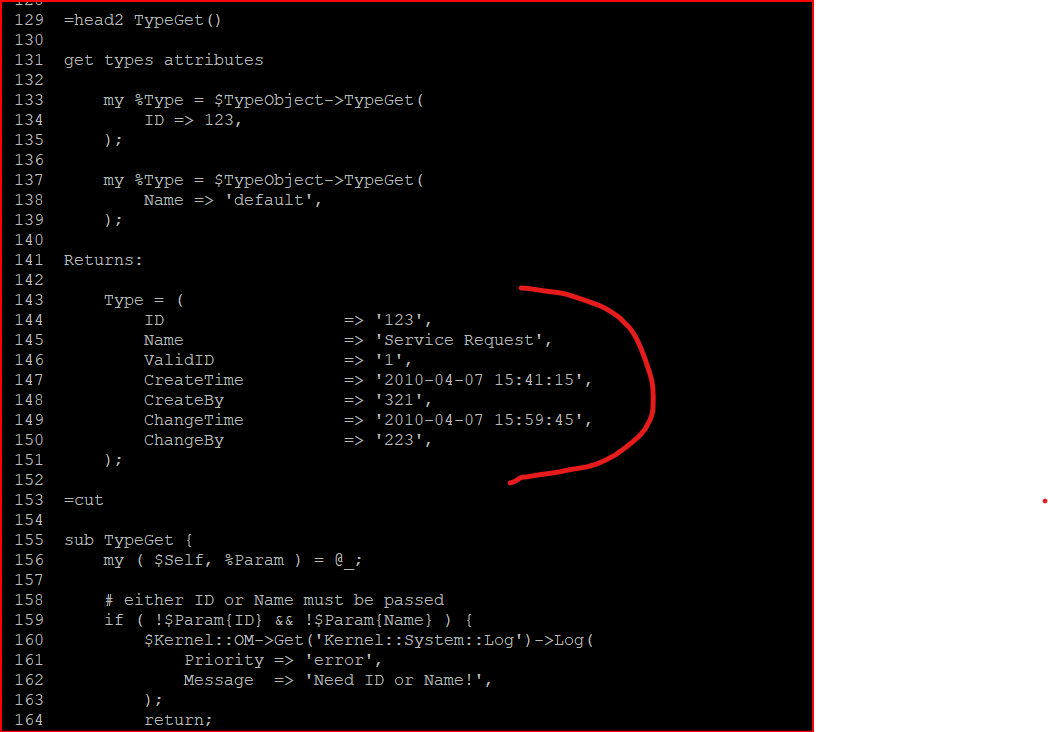
I also checked each of the „.pm“ files in the /Kernel/System directory and in one of the source code files (Type.pm) there’s a function returning this in the screenshot below. Is this normal? I’m not familiar with „perl language“ but the function seems to return one Type Specific.
-
14. September 2022 um 17:41 Uhr #13723
Hi Manny,
the table ticket_type does look fine. You also found the correct file. The function TypeGet() does indeed fetch informations specific to a single type. But the function throwing the error is the function TypeLookup() which simply translates the id to the name. See the line 429.
Looking at the code I don’t see much that could go wrong here. Do you really see the same messages in the log?
Module: Kernel::System::Type::TypeLookup Line: 429
Module: Kernel::System::Ticket::TicketGet Line: 1392Best regards,
Bernhard
-
15. September 2022 um 10:23 Uhr #13727
Hello Bernhard,
Unfortunately in the logs there’s nothing recorded. I have checked in the below log locations but there’s nothing recorded related to that.
:~/var/log/Daemon$ grep --color -n -C 27 'No TypeID for' *.log
:~/var/log/Daemon$ cd ..
:~/var/log$ grep --color -n -C 27 'No TypeID for' *.log
:~/var/log$The only log with errors is
/var/log/otobo.logfile. I have tailed to show a few samples as per screenshot below. The same error has been appearing for quite sometime but this is related to changes -
22. September 2022 um 13:05 Uhr #13771
I have decided to reinstall afresh and fix
-
5. Oktober 2022 um 18:00 Uhr #13949
Hello Guys,
if anyone can find a solution for this please share. I did a fresh install, but the problem has re-occurred even without doing anything.
I am using http in my OTOBO, could this be the problem?
I found an OTRS thread with similar problem but doesn’t seem to have been fixed
OTRS Scheduler Daemon CronTaskManager::Task::EscalationCheck – Znuny and ((OTRS)) Community Edition
-
-
AutorBeiträge




- Du musst angemeldet sein, um auf dieses Thema antworten zu können.