
-
AutorBeiträge
-
-
13. Oktober 2022 um 19:38 Uhr - Views: 2755 #14018
Não consigo receber os e-mail de abertura de chamado!
Backend ERROR: OTOBO-CGI-07 Perl: 5.32.1 OS: linux Time: Thu Oct 13 16:01:30 2022
Message: CommunicationLog(ID:4,AccountType:-,AccountID:-,Direction:Incoming,Transport:Email,ObjectLogType:Connection,ObjectLogID:4)::Kernel::System::MailAccount::POP3 => POP3TLS: Auth for user Alerts_ibmcloud@digisystem.com.br/outlook.office365.com failed!
RemoteAddress: 10.90.11.85
RequestURI: /otobo/index.pl?Action=AdminMailAccount;Subaction=Run;ID=1;ChallengeToken=xsNYXacQslIodZuEvGUnwIiar6sXbYHz;Traceback (18):
Module: Kernel::System::CommunicationLog::_LogError Line: 546
Module: Kernel::System::CommunicationLog::ObjectLog Line: 314
Module: Kernel::System::MailAccount::POP3::Fetch Line: 210
Module: Kernel::System::MailAccount::MailAccountFetch Line: 574
Module: Kernel::Modules::AdminMailAccount::Run Line: 88
Module: Kernel::System::Web::InterfaceAgent::Run Line: 1258
Module: Plack::Sandbox::_2fopt_2fotobo_2fbin_2fpsgi_2dbin_2fotobo_2epsgi::__ANON__ Line: 602
Module: CGI::Emulate::PSGI::__ANON__ (v0.23) Line: 30
Module: Plack::Middleware::HTTPExceptions::try {…} Line: 20
Module: (eval) (v0.31) Line: 100
Module: Try::Tiny::try (v0.31) Line: 93
Module: Plack::Middleware::HTTPExceptions::call Line: 23
Module: Plack::Component::__ANON__ Line: 50
Module: Plack::Sandbox::_2fopt_2fotobo_2fbin_2fpsgi_2dbin_2fotobo_2epsgi::__ANON__ Line: 408
Module: Plack::Sandbox::_2fopt_2fotobo_2fbin_2fpsgi_2dbin_2fotobo_2epsgi::__ANON__ Line: 318
Module: Plack::Middleware::ForceEnv::call (v0.02) Line: 18
Module: Plack::Component::__ANON__ Line: 50
Module: Plack::Middleware::ReverseProxy::call (v0.16) Line: 68
Module: Plack::Component::__ANON__ Line: 50
Module: Plack::Middleware::Conditional::call Line: 16
Module: Plack::Component::__ANON__ Line: 50
Module: Plack::Middleware::ErrorDocument::call Line: 15
Module: Plack::Component::__ANON__ Line: 50
Module: Plack::App::URLMap::call Line: 71
Module: Plack::Component::__ANON__ Line: 50
Module: Plack::Middleware::Conditional::call Line: 16
Module: Plack::Component::__ANON__ Line: 50
Module: Plack::Sandbox::_2fopt_2fotobo_2fbin_2fpsgi_2dbin_2fotobo_2epsgi::__ANON__ Line: 373
Module: Plack::Sandbox::_2fopt_2fotobo_2fbin_2fpsgi_2dbin_2fotobo_2epsgi::__ANON__ Line: 358
Module: (eval) Line: 145 -
13. Oktober 2022 um 20:40 Uhr #14020
Hi José,
Microsoft is disabling Basic Auth in Office 365 these days.
We’ve collected some information about it and how to activate Modern Auth in OTOBO in our News section.
Hope this helps!
Kind regards,
Grit
Team OTOBO-
14. Oktober 2022 um 3:06 Uhr #14021
thanks for your time in replying
Jose Ricardo
-
-
14. Oktober 2022 um 3:28 Uhr #14022
Grit you would have doc to update docker version 10.0.16
MailAccount-OAuth2 10.1.1 informação do pacote
Pacote de Instalação requer atualização do OTOBO
Por favor note que a sua versão do OTOBO instalada é 10.0.16.Este pacote smente pode ser instalado na versão 10.1.x ou superior do OTOBO.
Por que eu deveria manter o OTOBO atualizado?
Você receberá atualizações sobre questões de segurança relevantes.
Você receberá atualizações para todos os outros problemas relevantes do OTOBO.
Como eu posso fazer uma atualização de nível de patch se eu não tenho um contrato?
Você encontra toda informação relevante dentro das informações de atualização em doc.otobo.org.No caso de você ter mais perguntas, teremos prazer em respondê-las.
Por favor visite nosso portal de clientes e registre um pedido. -
14. Oktober 2022 um 15:07 Uhr #14029
Hi Jose,
If you open Admin – Administracao de pacotes (or similar;) you should be able to download the package for your 10.0.16 system.If that doesn’t work you can also open the file and change the framework attribute from 10.1.x to 10.0.x there. There’s no real difference between the two versions.
Greetings to Brasil!
Grit -
15. Oktober 2022 um 1:19 Uhr #14035
thank you!
-
24. November 2022 um 15:40 Uhr #14306
Hello,
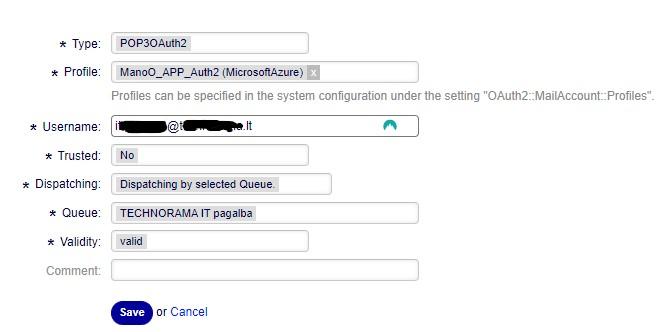
I have an issue with the OAuth2 Authentication setup.
I have made all configurations as in show in the manual, but I don’t receive emails from the server.
I don’t receive new tickets :(
When I add under „Admin -> PostMaster Mail Account“ connection credentials and then save the settings I’m redirected to „Azure Active Directory“ login.

After entering the password, then I Accept Azure information and I’m redirected to the Otobo Dashboard.
I don’t receive any problems from wrong connections and et.c
But, when I check configuration under „Admin -> PostMaster Mail Account“ – there is no set configuration.
Where can be a problem, and how I can solve it?
Best Regards,
Domas
-
25. November 2022 um 15:09 Uhr #14316
I found where was the issue in my case. Redirect URL must be this = https://<OTOBO address>/otobo/index.pl?Action=AdminMailAccount
-
-
-
AutorBeiträge



- Du musst angemeldet sein, um auf dieses Thema antworten zu können.