• Deutsch
  • English
  • Anmeldung OTOBO Community
+49 (0)9427 68 39 000
OTOBO
  • SOFTWARE
    • Software | Überblick
    • IT Service Management
    • Customer Service Management
    • Enterprise Service Management
    • Demo
    • Download
    • Dokumentation
  • SERVICES
    • Überblick Services
    • Beratung
    • Training
    • Entwicklung
    • OTRS Migration zu OTOBO
    • Support
    • Managed Service
    • Support-Portal
  • UNTERNEHMEN
    • Über uns
    • Karriere
    • Partner
    • Kontakt
    • Newsletter
  • RESSOURCEN
  • COMMUNITY
    • Open Source
    • Community Forum
    • Download
    • Dokumentation
    • OTOBO übersetzen
  • Click to open the search input field Click to open the search input field Suche
  • Menü Menü

Schlagwörter: Note, Notification Tags, Templates

Ansicht von 11 Antwort-Threads
  • Autor
    Beiträge
    • 13. November 2020 um 16:30 Uhr - Views: 1744 #10030
      Linda
      Teilnehmer

        Hi,

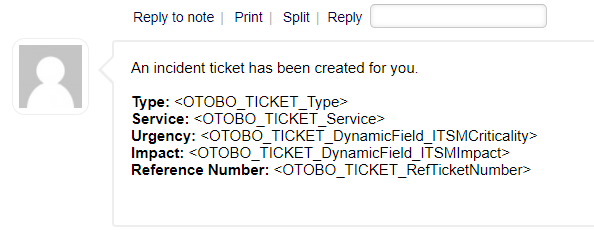
        I tried using OTOBO tags in notes/articles as an Agent, but it doesn’t seem to fill in the values automatically:

        Is there a way to do this in notes/articles? Thanks in advance.

      • 16. November 2020 um 10:33 Uhr #10036
        Stefan Rother
        Administrator

          Hi Linda,

          I think you need to add a new Template in Admin -> Templates (Typ Note), including the needed notification tags. After choosing the note template, the content normally is filled.

          But it’s not possible at the moment to copy the notification tags to an empty note. If you need a function like this, please contact hello@otobo.de.

          Best wishes from Germany,

          Stefan

          Team OTOBO

        • 16. November 2020 um 13:35 Uhr #10039
          Linda
          Teilnehmer

            Hi Stefan,

            Thank you for your answer, this is exactly what I need.

            In addition to this, is it possible to automatically send this template in a note after creating a certain ticket type? I’ve found that in Generic Agent you can add a note, but there you cannot select a template, and I assume that you cannot use the OTOBO tags in this note either.

          • 16. November 2020 um 13:46 Uhr #10040
            Linda
            Teilnehmer

              To specify, I know that there are ticket notifications, but these send an email that does not appear in the client portal. I would like the note to show up in the client portal as well.

            • 16. November 2020 um 14:25 Uhr #10041
              Stefan Rother
              Administrator

                Hi Linda,

                Have you tried activating „Article visible for customer“ in Admin -> Ticket Notifications? Then it should also be available in the customer area.

                Best regards,

                Stefan

                Team OTOBO

              • 16. November 2020 um 15:00 Uhr #10042
                Linda
                Teilnehmer

                  The article is visible for the customer, but at the moment I have to add the article manually. I would like the article to be added automatically after creating a certain ticket type.

                • 16. November 2020 um 16:48 Uhr #10044
                  Stefan Rother
                  Administrator

                    Hi,

                    article manually. I would like the article to be added automatically after creating a certain ticket type.

                    Manually or automatically? You could create the message automatically when the type changes?

                    Manual creation afterwards by note is currently not possible. If you need this function, please contact hello@otobo.de. We will gladly send you an offer for the function.

                    With kind regards,

                    Stefan

                    Team OTOBO

                  • 16. November 2020 um 18:03 Uhr #10047
                    Stefan Rother
                    Administrator

                      Hi Linda,

                      we have discussed your request again and are not quite sure how to understand it. Can you please just describe in more detail what you would like to do?

                      Thanks,

                      Stefan

                      Team OTOBO

                    • 17. November 2020 um 16:19 Uhr #10065
                      Linda
                      Teilnehmer

                        Hi,

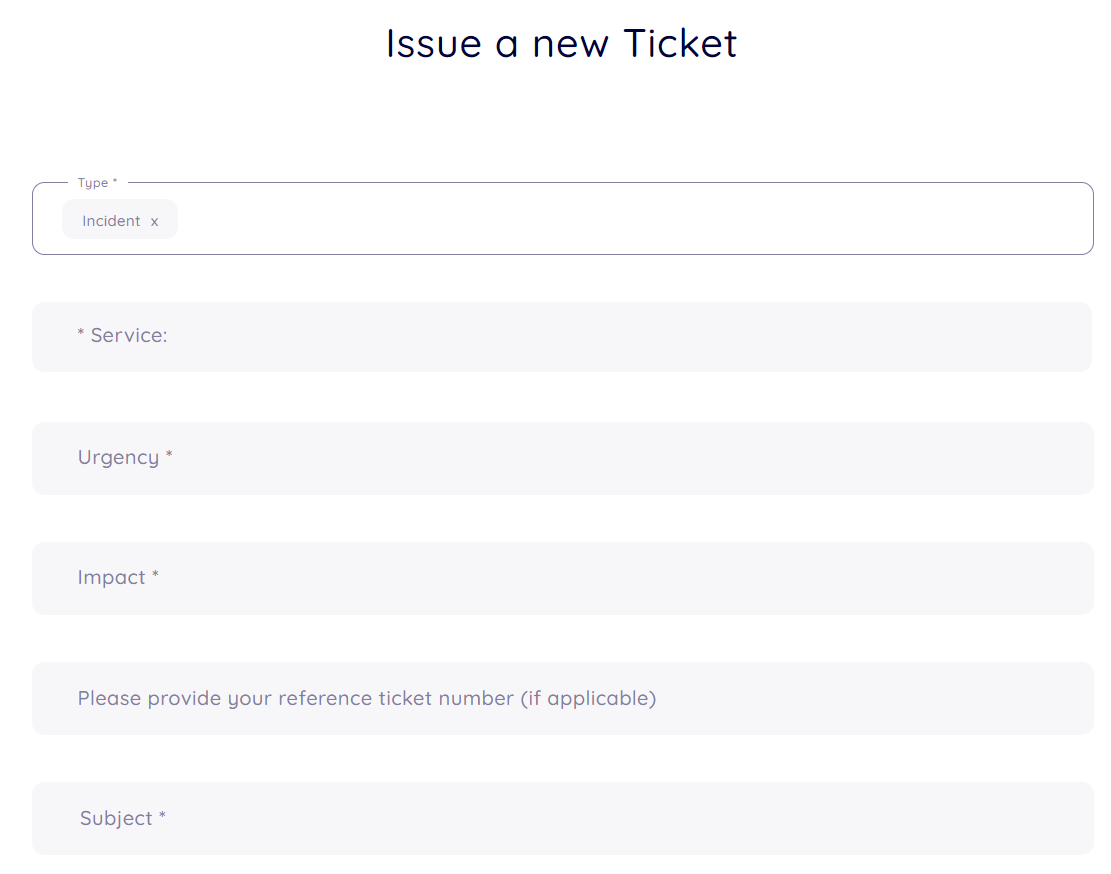
                        I created a custom ticket type, Incident, with the following fields:

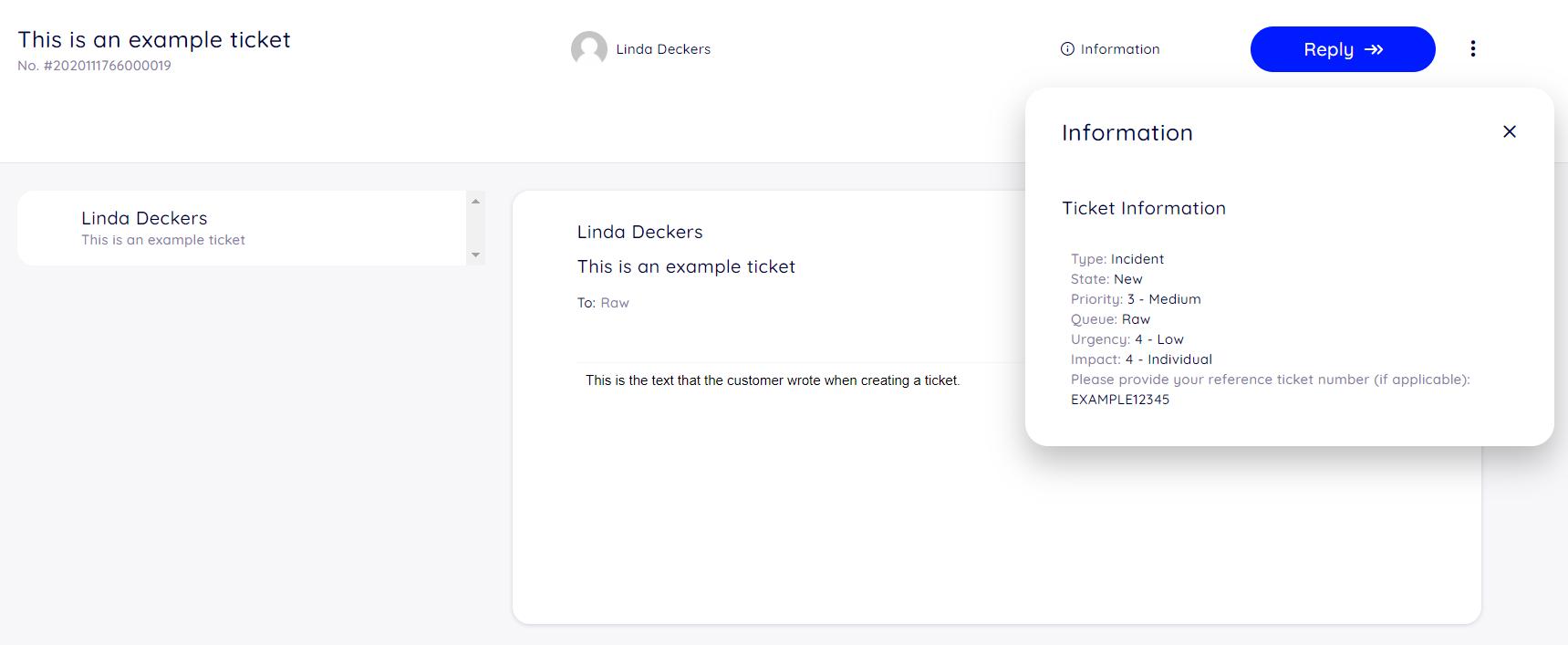
                        At the moment when a customer creates a ticket, what appears in the client portal is the message they wrote in the text box. If they want to see the values they filled in the fields, they have to click the i, as is seen here:

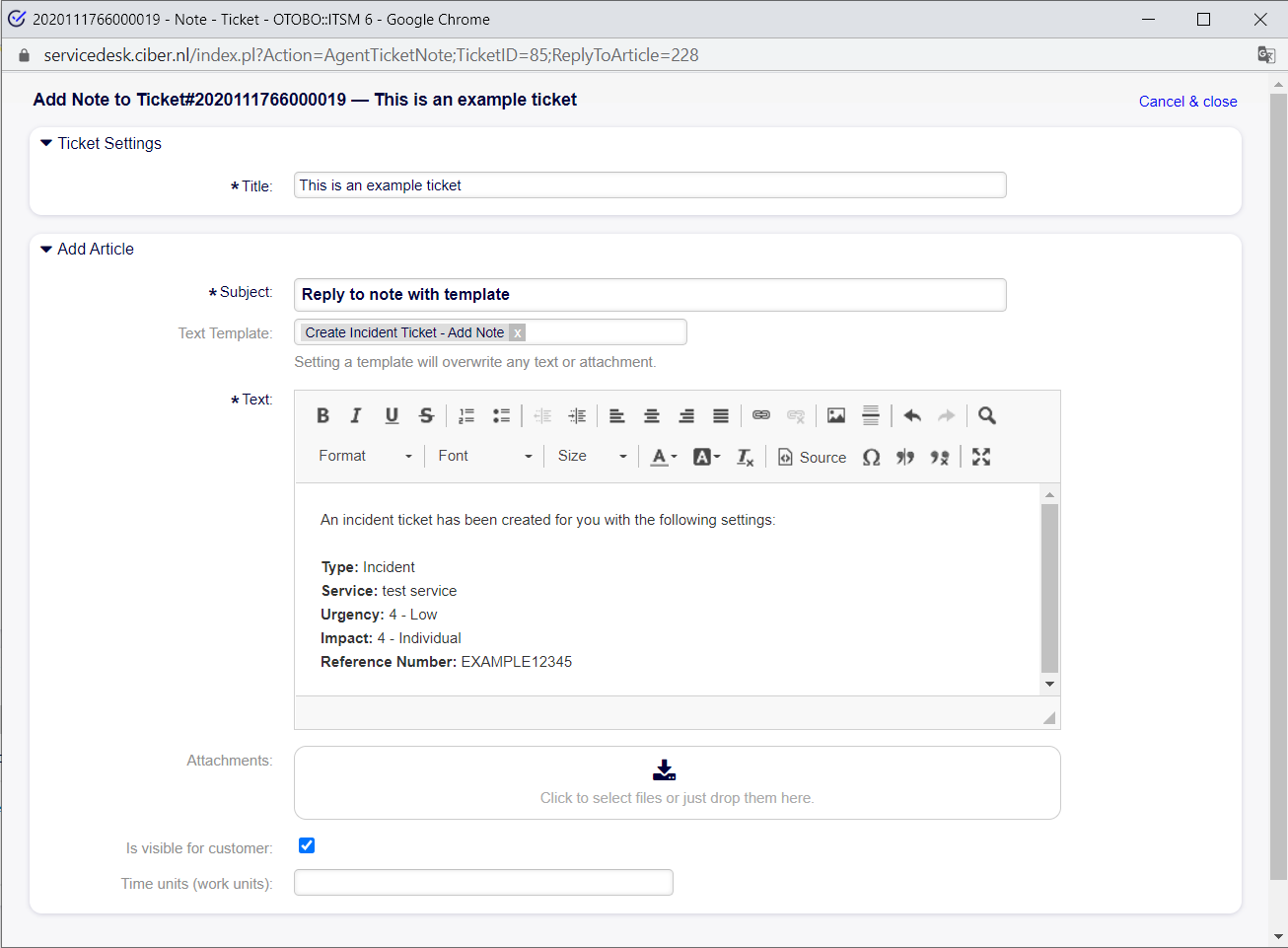
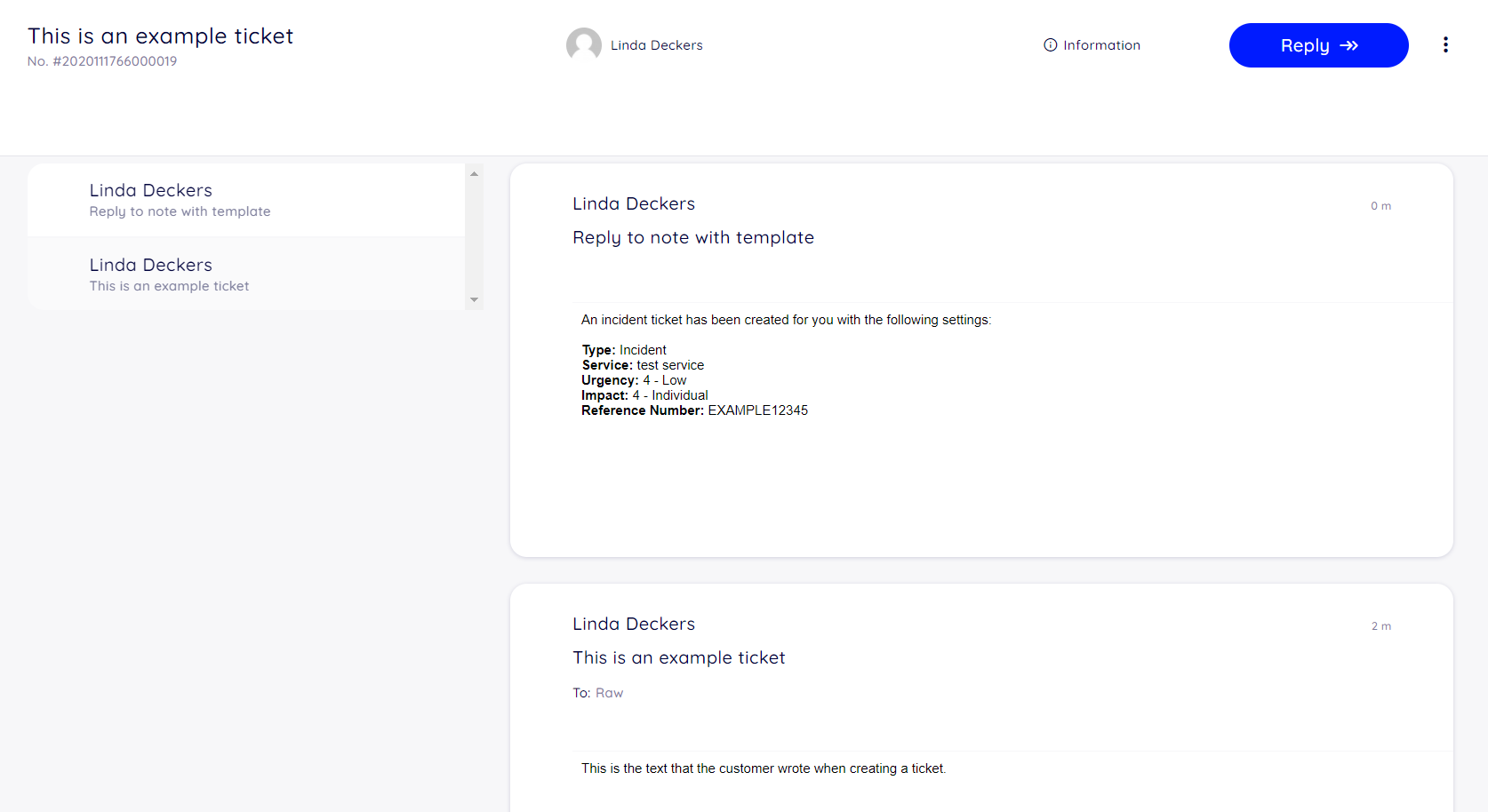
                        Now I want that information that you get when clicking the i, at the same place where you see the customer message. My current solution is that the agent replies to this ticket with a template which shows the field values, as is seen here:

                        This solution works, BUT, the agent has to reply to the ticket with the template manually. So if an agent has to handle 100 tickets, he has to reply to all 100 tickets himself. I want this to be done automatically. So when a customer creates a ticket with type „incident“ the system automatically replies with this template in a note, so it will show up in the client portal as this:

                        (This screenshot might be a bit confusing, the first note is created by the customer, the second note has been created by the agent, they happen to have the same name)

                        My question is if it is possible to send this template automatically after a ticket with type incident has been created.

                        I hope this is enough information. Please let me know if you need any additional information. Thank you for your time.

                      • 18. November 2020 um 7:27 Uhr #10066
                        Stefan Rother
                        Administrator

                          Good Morning Linda,

                          ok, I hope I understand now your requirements.

                          I think this is easily possible via OTOBO Ticket-Notifications.
                          Please change under Admin -> Ticket-Notifications and add a new notification. As event please choose „NotificationNewTicket“, if the notification should only be sent for incidents, please choose under „Ticket Filter“ the type „Incident“.

                          Then select „Article visible for customer: 1“, as I have already described in my previous post.

                          Afterwards, for every new ticket with the type „Incident“, the information should be sent to the customer by e-mail as desired – and the article is also visible in the customer area.

                          I hope we found now a possible solution for you.

                          Best regards,

                          Stefan

                          Team OTOBO

                        • 18. November 2020 um 10:24 Uhr #10067
                          Linda
                          Teilnehmer

                            Hi Stefan,

                            I think I misunderstood you before. This is indeed what I want. Thank you for your help :)!

                          • 18. November 2020 um 10:31 Uhr #10068
                            Stefan Rother
                            Administrator

                              Hi Linda,

                              no problem, have fun with OTOBO!

                              Best regards,

                              Stefan

                              Team OTOBO

                          • Autor
                            Beiträge
                          Ansicht von 11 Antwort-Threads
                          • Du musst angemeldet sein, um auf dieses Thema antworten zu können.

                          Foren durchsuchen

                          Anmeldung

                          Anmeldung

                          Konto erstellen
                          Passwort vergessen?

                          Login via Social

                          Profil

                          Bitte vervollständigen Sie nach der Registrierung Ihr Profil, das vereinfacht die spätere Kommunikation enorm. Ihre Profileinstellung finden Sie, wenn Sie auf Ihr Avatarbild klicken.

                          Sie können Ihren Avatar ändern, indem Sie sich mit Ihrer E-Mail-Adresse unter gravatar.com registrieren.

                          Letzte Aktivitäten

                          • Dynamische Felder in AgentTicketNote mit ACL verstecken
                          • FAQ: kaputtes Copy & Paste von Bildern zwischen Artikeln
                          • Benachrichtigung „Ticket wurde mir entzogen“ möglich?
                          • Statistik Anzahl Tickets pro Agent
                          • Docker: Ändern des redis Hosts

                          Unternehmen

                          Über uns
                          Karriere
                          Stellenbörse
                          Partner werden
                          Kontakt
                          Newsletter

                          OTOBO | Simplify work and create exceptional service experiences.

                          Die Source Code Owner und Maintainer hinter OTOBO.

                          Software

                          Service Management-Plattform
                          OTOBO Demo
                          OTOBO Download
                          OTOBO Dokumentation

                          Security-Problem melden:
                          security@otobo.org

                          Services

                          Support-Portal
                          Beratung
                          Training
                          Support
                          Managed Services
                          Erweiterung
                          OTRS Migration
                          Partner finden

                          Community

                          Open Source
                          Community Forum
                          Mitmachen
                          OTOBO Developer
                          OTOBO@GitHub

                          © 2026 Rother OSS GmbH | All rights reserved.
                          • Cookie-Einstellungen
                          • Impressum
                          • Datenschutz
                          • Haftungsausschluss
                          Nach oben scrollen Nach oben scrollen Nach oben scrollen