
-
AutorBeiträge
-
-
7. Januar 2026 um 14:20 Uhr - Views: 294 #38540
Hello,
I am having trouble configuring LDAP on otobo/customer.pl so that users can log in to the portal directly with SSO.
Could I get some help or documentation directly?Thank you.
For your information, I am using version 11. -
7. Januar 2026 um 15:31 Uhr #38546
Hi Raphael,
LDAP as an authentication method does not allow for SSO. However, it allows your costumers to use the password from LDAP to authenticate. Further you need the account data of the customer which may also me synced from the same LDAP. Please refer to the defaults config to obtain an overview: https://github.com/RotherOSS/otobo/blob/rel-11_0/Kernel/Config/Defaults.pm
Best regards,
Arnold -
7. Januar 2026 um 15:43 Uhr #38548
Hello Arnold,
Is it possible to use SSO with Otobo?
-
7. Januar 2026 um 15:50 Uhr #38549
Absolutly. You need an SSO service that speaks OIDC or Kerberos. What SSO solution are currently employing?
-
7. Januar 2026 um 16:29 Uhr #38550
So I have just confirmed on my end that it must be LDAP linked to our AD.
-
8. Januar 2026 um 13:11 Uhr #38573
Hello Arnold,
When I run a command to check if my Otobo server is properly connected to LDAP, it works, but I can’t see my client users on Otobo. Is this normal? And I can’t log in with my AD credentials.
-
8. Januar 2026 um 14:17 Uhr #38575
When I try to log in to customer.pl, I get this error message:
Authentication succeeded, but no customer record is found in the customer backend. Please contact the administrator. -
9. Januar 2026 um 9:23 Uhr #38598
Authentication succeeded, but no customer record is found in the customer backend. Please contact the administrator.
Ah! That is actually more helpful than you realize. You can authenticate successfully. That means that OTOBO can verify the provided username and password on login. Now you are missing a user record in OTOBO that represents that user. I assume you would like the same data (from LDAP). So I suggest you sync that data from LDAP aswell. Configure this to setup LDAP as a backend for your customer user data: https://github.com/RotherOSS/otobo/blob/rel-11_0/Kernel/Config/Defaults.pm#L1744-L1819
Good look,
Arnold -
9. Januar 2026 um 9:34 Uhr #38599
Thank you, I can connect with LDAP, but is there an automatic link?
For example, if a user submits a ticket by email, will it automatically be sent to customer.pl?
And is it possible to ensure that each manager in each department has access to their department’s tickets, but that other users only see their own tickets? -
9. Januar 2026 um 11:55 Uhr #38605
Thank you, I can connect with LDAP, but is there an automatic link?
For example, if a user submits a ticket by email, will it automatically be sent to customer.pl?If the ticket is created by email and the email address belongs to customer user (you can check that from the admin panel) the customer user is assigned automatically by OTOBO and is visible for the user in the customer portal.
And is it possible to ensure that each manager in each department has access to their department’s tickets, but that other users only see their own tickets?
That certainly is possible, however configuration is a tiny bit daunting. You need to create a customer in OTOBO for each department. The customer id has to be reflected in LDAP. Customer users should be assigned to customers by LDAP mapping like this: https://github.com/RotherOSS/otobo/blob/rel-11_0/Kernel/Config/Defaults.pm#L1806
Now, we want to limit CompanyTicketAccess (enabled by default) limit the access to a customer user group.
Create a group like „Management“ and assign the managers to this group: https://doc.otobo.de/manual/admin/11.0/en/content/administration-area/users-groups-roles/customer-users-groups.html. Now, navigate to Admin -> System Settings ->CustomerFrontend::Navigation###CustomerTicketOverview###002-Ticketand set the visibility to the management group.A tip: It might help to activate the System Setting
SwitchToCustomerto test the configuration with the users like they appear in the directory service. -
14. Januar 2026 um 10:21 Uhr #38709
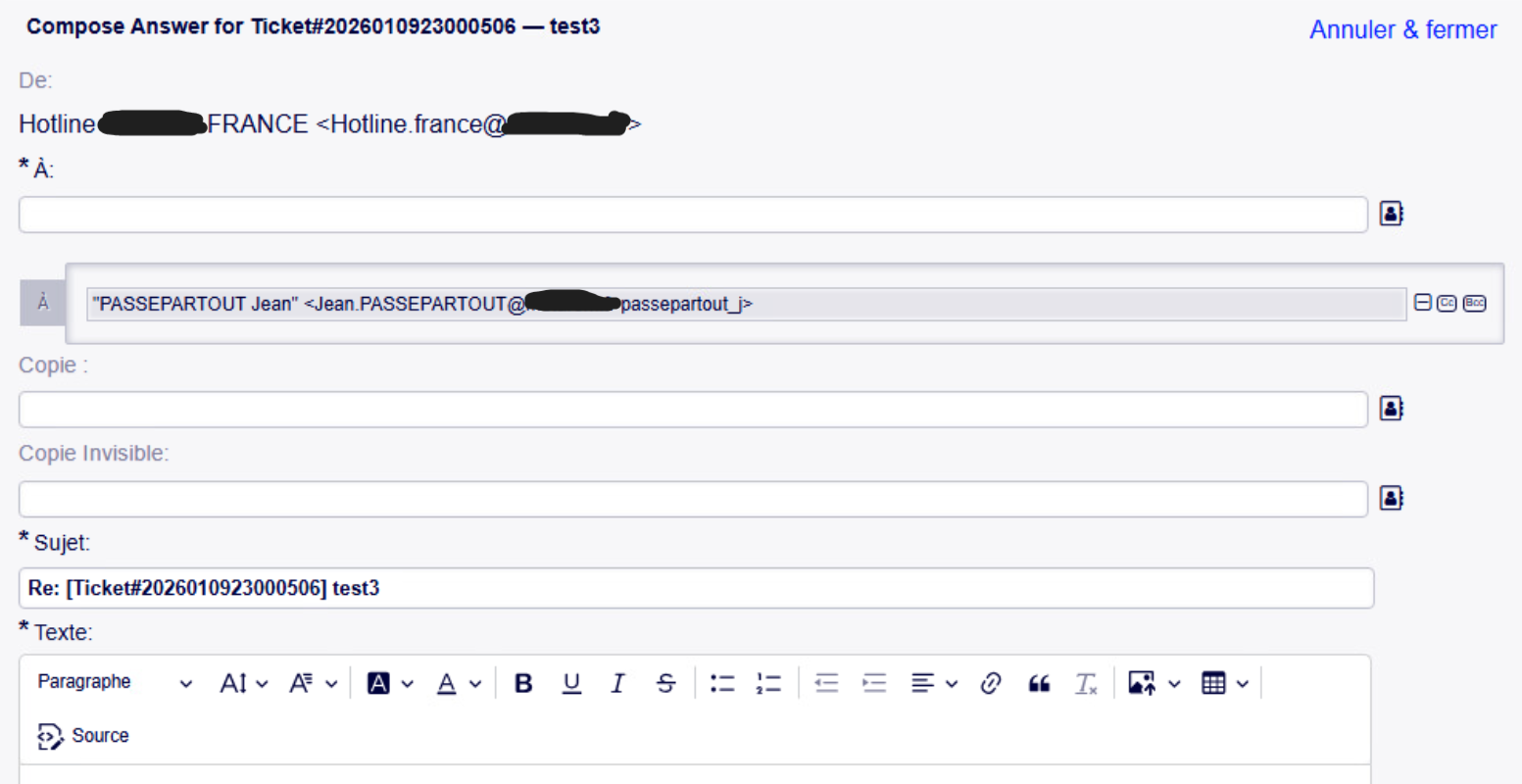
Hello, I have a new problem. I managed to set up LDAP, but in Otobo, when I wanted to reply to a ticket, it gave me the email address + the SAMAccount, so it doesn’t work because the email address is required in the reply. How can I fix this error? Thank you.
-
14. Januar 2026 um 10:28 Uhr #38712
<exemple : raphael@blabla.com riquet-raphael>
-
14. Januar 2026 um 12:20 Uhr #38725
Have a look at the CustomerUser data in the admin panel. What is filled in the field email? Is it a valid email address?
-
14. Januar 2026 um 13:07 Uhr #38728
Okay, so I need to go to Administrator > System Configuration > and look for CustomerUser?
-
14. Januar 2026 um 14:03 Uhr #38732

You can clearly see the fields that are good. -
14. Januar 2026 um 14:54 Uhr #38736
Okay, then walk me through the error scenario…
I assume you are in the TicketZoom and on top of the Article you press „Reply“.
If that is correct. Please inspect the sender of the article you are responding to (Icon of aniin the top right of the article and then hover the entry in the from field). -
14. Januar 2026 um 15:02 Uhr #38739As seen in the image, there is a ticket to create, and when I want to reply to it, it doesn’t work because we see the LDAP username passepartout_j. And I can’t find the i.
-
14. Januar 2026 um 15:31 Uhr #38740
That is the response mask.
What is the sender of the article you are replying to?
-
14. Januar 2026 um 15:36 Uhr #38742
This is the window for responding to a ticket.
The user sent us a ticket by email, and we received it on Otobo. The image shows when we responded > empty response. -
15. Januar 2026 um 9:00 Uhr #38751
The user sent us a ticket by email, and we received it on Otobo. The image shows when we responded > empty response.
Right. But what is the email address of the user that sent the email that created the ticket. What does OTOBO show in the article (the email that created the ticket)? Please inspect the sender of the article you are responding to (Icon of an i in the top right of the article and then hover the entry in the from field).
-
15. Januar 2026 um 10:05 Uhr #38754
When I press “i,” I get this information.
-
15. Januar 2026 um 12:24 Uhr #38763
Nice. Now hover the mouse cursor over the sender and you will see what otobo parsed from the email.
-
15. Januar 2026 um 12:41 Uhr #38764
When I hover my mouse over it, I can see the email address, but the problem is that when I reply, it automatically puts the LDAP ID in. So it doesn’t work and we can’t reply to the ticket.
-
15. Januar 2026 um 12:56 Uhr #38766
But the ID is not part of the email as depicted in the sender of the article you are replying to?
-
15. Januar 2026 um 12:59 Uhr #38767
When I hover my mouse over it, I see that the email address is not the username, but when I want to reply to the ticket, it automatically fills in both.
-
15. Januar 2026 um 13:17 Uhr #38769
Please post from your
Config.pmthe settingCustomerUserListFields. -
15. Januar 2026 um 13:20 Uhr #38770
CustomerUserPostMasterSearchFields => [‚mail‘],
CustomerUserNameFields => [‚givenname‘, ’sn‘],
CustomerUserNameFieldsJoin => ‚ ‚,
CustomerUserExcludePrimaryCustomerID => 0,
AdminSetPreferences => 0,
CacheTTL => 0,Map => [
[ ‚UserTitle‘, Translatable(‚Title or salutation‘), ‚title‘, 1, 0, ‚var‘, “, 1, undef, undef ],
[ ‚UserFirstname‘, Translatable(‚Firstname‘), ‚givenname‘, 1, 1, ‚var‘, “, 1, undef, undef ],
[ ‚UserLastname‘, Translatable(‚Lastname‘), ’sn‘, 1, 1, ‚var‘, “, 1, undef, undef ],
[ ‚UserLogin‘, Translatable(‚Username‘), ’sAMAccountName‘, 1, 1, ‚var‘, “, 1, undef, undef ],
[ ‚UserEmail‘, Translatable(‚Email‘), ‚mail‘, 1, 1, ‚var‘, “, 1, undef, undef ],
[ ‚UserCustomerID‘, Translatable(‚CustomerID‘), ‚mail‘, 0, 1, ‚var‘, “, 1, undef, undef ],
[ ‚UserPhone‘, Translatable(‚Phone‘), ‚telephonenumber‘,1, 0, ‚var‘, “, 1, undef, undef ],
[ ‚UserAddress‘, Translatable(‚Address‘), ‚postaladdress‘, 1, 0, ‚var‘, “, 1, undef, undef ],
[ ‚UserComment‘, Translatable(‚Comment‘), ‚description‘, 1, 0, ‚var‘, “, 1, undef, undef ],
],
}; -
16. Januar 2026 um 10:21 Uhr #38798
Thanks for the code. However, it does not include
CustomerUserListFields.It should be set like:
CustomerUserListFields => ['cn', 'mail'],or
CustomerUserListFields => ['givenname', 'sn', 'mail'],always with mail as the last property.
-
16. Januar 2026 um 15:47 Uhr #38818
Great, it works! Now I just need to manage the groups so that managers have access to their departments‘ tickets.
-
3. Februar 2026 um 10:58 Uhr #39257
Hello Arnold, I haven’t been able to create groups with the managers.
I’ll give you an example to see if you can help me.
Jean is the HR manager. Bernard and Paul are just HR employees.
I would like Jean to be able to see Bernard and Paul’s tickets on the custom.pl portal, but I don’t want Paul and Bernard to have access to anyone else’s tickets. They shouldn’t be able to see other people’s tickets. -
4. Februar 2026 um 9:07 Uhr #39294
I explained the procedure here: https://otobo.io/forums/topic/configuration-ldap-2/#post-38605
Have you created and configured the Customers for the departments from LDAP?
Have you configured the Management group?
At which point are you?
-
-
AutorBeiträge



 As seen in the image, there is a ticket to create, and when I want to reply to it, it doesn’t work because we see the LDAP username passepartout_j. And I can’t find the i.
- Das Thema „ Configuration LDAP“ ist für neue Antworten geschlossen.