• Deutsch
  • English
  • Anmeldung OTOBO Community
+49 (0)9427 68 39 000
OTOBO
  • SOFTWARE
    • Software | Überblick
    • IT Service Management
    • Customer Service Management
    • Enterprise Service Management
    • Demo
    • Download
    • Dokumentation
  • SERVICES
    • Überblick Services
    • Beratung
    • Training
    • Entwicklung
    • OTRS Migration zu OTOBO
    • Support
    • Managed Service
    • Support-Portal
  • UNTERNEHMEN
    • Über uns
    • Karriere
    • Partner
    • Kontakt
    • Newsletter
  • RESSOURCEN
  • COMMUNITY
    • Open Source
    • Community Forum
    • Download
    • Dokumentation
    • OTOBO übersetzen
  • Click to open the search input field Click to open the search input field Suche
  • Menü Menü

Schlagwörter: Apache, Docker, ProxyPass

Ansicht von 13 Antwort-Threads
  • Autor
    Beiträge
    • 29. August 2022 um 14:41 Uhr - Views: 1881 #13627
      Giordano Torre
      Teilnehmer

        Good Morning,

        I have installed Otobo Docker on a server. Now Otobo is the only installation on this server.

        Next days I’d like installed Plesk Obsidian but i have any doubts.

        Plesk will use port 80 and 443. Those ports are used from otobo.

        I have tried to install otobo and plesk on my VM local and I have see that apache works.

        If I will install a new domain in plesk, will apache creates a new virtual host on 80 port?

        Has anyone tried installing plesk and otobo together?

        Thank You for support

      • 29. August 2022 um 16:47 Uhr #13628
        bes
        Teilnehmer

          Hi Giordano,

          reassigning only the ports should be easy as you are running OTOBO in Docker containers. The ports within the containers can stay as they are. Only the mappings to the ports that are visible on the Docker host must be adapted. The can be done with the variables OTOBO_WEB_HTTP_PORT and OTOBO_WEB_HTTPS_PORT in your .env file.

          Another possibility is to  run OTOBO  only with HTTP on e.g. Port 81. Then you can do your SSL-termination on the the Apache running on the Docker host. In the Apache-config you can then set up a ProxyPass to OTOBO. An example, for a slightly different case, is in https://github.com/RotherOSS/otobo/blob/rel-10_1/scripts/apache2-httpd-plack-proxy.include.conf .

          Best regards.

          Bernhard


        • 30. August 2022 um 9:38 Uhr #13633
          Giordano Torre
          Teilnehmer

            Hi Bes,

            thank you for your reply and support.

            You advise me to change ports 80 and 443 in the env file to 81 and 543, for example.

            Could you kindly tell me how to proceed?

            A thousand thanks


          • 30. August 2022 um 10:49 Uhr #13635
            Giordano Torre
            Teilnehmer

              Hi Bes,

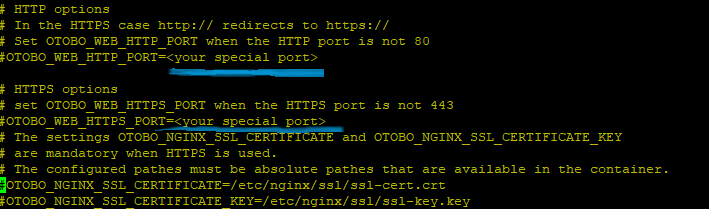
              This is my env file. I enable and add the custom port for http and https, for example 81 and 543.

              I don’t know how i can reload the configuration for activate the modify.


              Thank You


            • 30. August 2022 um 11:27 Uhr #13636
              bes
              Teilnehmer

                Hi Giordano,

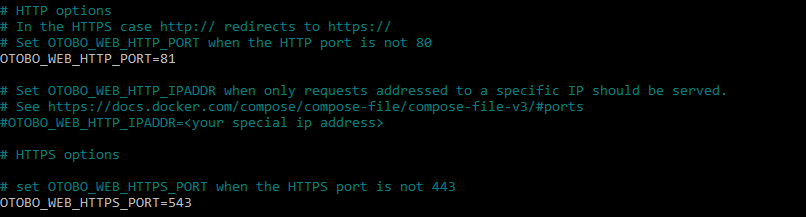
                changing the ports is documented in https://doc.otobo.org/manual/installation/10.1/en/content/installation-docker.html#choosing-non-standard-ports.  But that documentation is fairly concise. So, here is an example. In the file  otobo-docker/.env I have the following declarations:

                # HTTP options
                # In the HTTPS case http:// redirects to https://
                # Set OTOBO_WEB_HTTP_PORT when the HTTP port is not 80
                OTOBO_WEB_HTTP_PORT=81

                # HTTPS options# set OTOBO_WEB_HTTPS_PORT when the HTTPS port is not 443
                OTOBO_WEB_HTTPS_PORT=543

                This changes the ports that are occupied on the Docker host:

                $ docker ps
                CONTAINER ID IMAGE COMMAND CREATED STATUS PORTS NAMES
                ...
                d9dce0e1a262 otobo-nginx-webproxy:local-10.1.x "/docker-entrypoint.…" 21 minutes ago Up 21 minutes (healthy) 80/tcp, 0.0.0.0:<strong>81</strong>->8080/tcp, 0.0.0.0:<strong>543</strong>->8443/tcp otobo_nginx_1

                ...


                Therefore when fetching http://localhost:81/otobo/index.pl I get a redirect to HTTPS. When fetching https://localhost:543/otobo/index.pl  then OTOBO can be accessed.

                When trying this in my local installation I noticed that the redirect to HTTPS still uses the default port 443. This will be fixed in one of the next releases, see https://github.com/RotherOSS/otobo/issues/1892.

                Best regards,

                Bernhard


              • 30. August 2022 um 12:00 Uhr #13638
                Giordano Torre
                Teilnehmer

                  Bes, I have modified the parameter in my VM test but nginx is down now.

                  Infact I don’t see nginx active.

                  If I try reload nginx service, I have:

                  Thank You

                • 30. August 2022 um 12:08 Uhr #13640
                  Giordano Torre
                  Teilnehmer

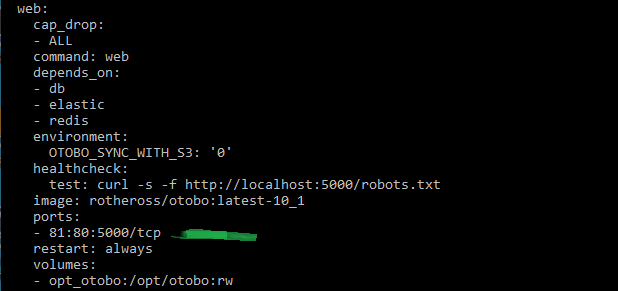
                    This is my config file.


                  • 30. August 2022 um 12:17 Uhr #13641
                    Giordano Torre
                    Teilnehmer

                      After plesk installation nginx volume there isn’t anymore.

                    • 30. August 2022 um 16:44 Uhr #13643
                      Giordano Torre
                      Teilnehmer

                        I understood where I was wrong.

                        I can’t see nginx service because i used http env file.

                        Now I have create self signed certified and I’m tring with https env file.


                      • 30. August 2022 um 17:31 Uhr #13644
                        Giordano Torre
                        Teilnehmer

                          I have modified the env file but doesn’t work fine.

                          Thank You for support

                        • 31. August 2022 um 9:27 Uhr #13645
                          bes
                          Teilnehmer

                            Hi Giordano,

                            your changed .env file looks fine. But I see that the old ports 80 and 443 are still exposed on the Docker host. Did you restart the containers after the config change?

                            docker-compose down

                            docker-compose up -d

                            Best regards,

                            Bernhard

                          • 31. August 2022 um 10:27 Uhr #13646
                            Giordano Torre
                            Teilnehmer

                              Hi Bes,

                              thank you for your reply.

                              Now I see otobo on 543 port, works fine.

                              I noticed that plesk use those ports 8443 for https and 3306 for mysql, too.

                              Otobo listens on 8443 port and 3306 for mariaDB.

                              Is it possible change mariadb port and https listen port?

                              Thank You


                            • 31. August 2022 um 13:03 Uhr #13647
                              bes
                              Teilnehmer

                                Hi Giodano,

                                the ports 8443 for NginX and 3306 for MaraDB are per default only used  internally in the OTOBO container network. They should not conflict with ports on the Docker hosts or with ports in other container networks. A conflict can only occur with the exposed ports that are reported by docker-compose ps.

                                However, during development, I often expose the MariaDB port so that I can use a GUI for inspecting the database. There I map port 3306 to 3307 so that it doesn’t conflict with a locally running database.

                                $git diff
                                diff --git a/docker-compose/otobo-base.yml b/docker-compose/otobo-base.yml
                                index 875df06..d634d99 100644
                                --- a/docker-compose/otobo-base.yml
                                +++ b/docker-compose/otobo-base.yml
                                @@ -29,8 +29,8 @@ services:
                                # like MySQL Workbench is used. Uncomment the following lines for making MariaDB available
                                # on port 3307 on the Docker host. A non-standard port is chosen here, because 3306 is
                                # often already used on the Docker host.
                                - # ports:
                                - # - "3307:3306"
                                + ports:
                                + - "3307:3306"

                                # Set the db root password which has to be entered when running otobo/installer.pl.
                                # The passwort is secret and can be stored in the file .env.


                              • 6. September 2022 um 15:55 Uhr #13663
                                Giordano Torre
                                Teilnehmer

                                  Thank You Bes,

                                  you can close the ticket..works fine!


                              • Autor
                                Beiträge
                              Ansicht von 13 Antwort-Threads
                              • Du musst angemeldet sein, um auf dieses Thema antworten zu können.

                              Foren durchsuchen

                              Anmeldung

                              Anmeldung

                              Konto erstellen
                              Passwort vergessen?

                              Login via Social

                              Profil

                              Bitte vervollständigen Sie nach der Registrierung Ihr Profil, das vereinfacht die spätere Kommunikation enorm. Ihre Profileinstellung finden Sie, wenn Sie auf Ihr Avatarbild klicken.

                              Sie können Ihren Avatar ändern, indem Sie sich mit Ihrer E-Mail-Adresse unter gravatar.com registrieren.

                              Letzte Aktivitäten

                              • FAQ: kaputtes Copy & Paste von Bildern zwischen Artikeln
                              • Dynamische Felder in AgentTicketNote mit ACL verstecken
                              • Benachrichtigung „Ticket wurde mir entzogen“ möglich?
                              • Statistik Anzahl Tickets pro Agent
                              • Docker: Ändern des redis Hosts

                              Unternehmen

                              Über uns
                              Karriere
                              Stellenbörse
                              Partner werden
                              Kontakt
                              Newsletter

                              OTOBO | Simplify work and create exceptional service experiences.

                              Die Source Code Owner und Maintainer hinter OTOBO.

                              Software

                              Service Management-Plattform
                              OTOBO Demo
                              OTOBO Download
                              OTOBO Dokumentation

                              Security-Problem melden:
                              security@otobo.org

                              Services

                              Support-Portal
                              Beratung
                              Training
                              Support
                              Managed Services
                              Erweiterung
                              OTRS Migration
                              Partner finden

                              Community

                              Open Source
                              Community Forum
                              Mitmachen
                              OTOBO Developer
                              OTOBO@GitHub

                              © 2026 Rother OSS GmbH | All rights reserved.
                              • Cookie-Einstellungen
                              • Impressum
                              • Datenschutz
                              • Haftungsausschluss
                              Nach oben scrollen Nach oben scrollen Nach oben scrollen