• Deutsch
  • English
  • Anmeldung OTOBO Community
+49 (0)9427 68 39 000
OTOBO
  • SOFTWARE
    • Software | Überblick
    • IT Service Management
    • Customer Service Management
    • Enterprise Service Management
    • Demo
    • Download
    • Dokumentation
  • SERVICES
    • Überblick Services
    • Beratung
    • Training
    • Entwicklung
    • OTRS Migration zu OTOBO
    • Support
    • Managed Service
    • Support-Portal
  • UNTERNEHMEN
    • Über uns
    • Karriere
    • Partner
    • Kontakt
    • Newsletter
  • RESSOURCEN
  • COMMUNITY
    • Open Source
    • Community Forum
    • Download
    • Dokumentation
    • OTOBO übersetzen
  • Click to open the search input field Click to open the search input field Suche
  • Menü Menü
Ansicht von 0 Antwort-Threads
  • Autor
    Beiträge
    • 9. Februar 2024 um 11:22 Uhr - Views: 914 #29684
      Daniel dos Santos
      Teilnehmer

        Hi,

        I have created a „text area field“ type as dynamic field being specified by the customer when submitting a ticket.

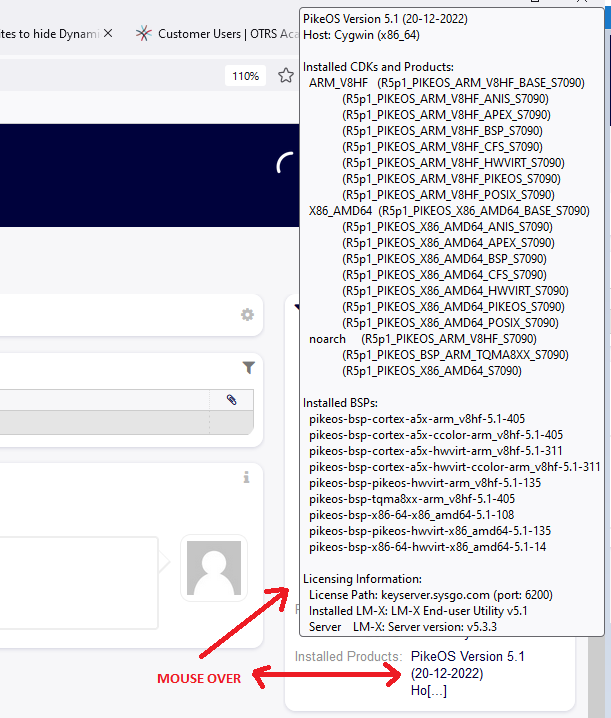
        At the moment the content of that text area is displayed on the ticket information side bar (see screenshot below).

        When I do a mouse over I get an overview which is already good but:

        1- Is there a way to have it constantly displayed? Maybe part of the ticket information directly and not via a pop up?

        2- Is it possible to change the size of that pop up window as it only displays a part of the text area information?

        3- Any advice where it would be the best to display that information?

        I have tried to display that information under the Article info (with an another dynamic field type article) but the size is also restricted there. The idea is to have that information clearly available for the agent processing the ticket. The best would be directly somewhere in the agent ticket zoom view.

        Thanks in advance for your help

    • Autor
      Beiträge
    Ansicht von 0 Antwort-Threads
    • Du musst angemeldet sein, um auf dieses Thema antworten zu können.

    Foren durchsuchen

    Anmeldung

    Anmeldung

    Konto erstellen
    Passwort vergessen?

    Login via Social

    Profil

    Bitte vervollständigen Sie nach der Registrierung Ihr Profil, das vereinfacht die spätere Kommunikation enorm. Ihre Profileinstellung finden Sie, wenn Sie auf Ihr Avatarbild klicken.

    Sie können Ihren Avatar ändern, indem Sie sich mit Ihrer E-Mail-Adresse unter gravatar.com registrieren.

    Letzte Aktivitäten

    • FAQ: kaputtes Copy & Paste von Bildern zwischen Artikeln
    • Dynamische Felder in AgentTicketNote mit ACL verstecken
    • Benachrichtigung „Ticket wurde mir entzogen“ möglich?
    • Statistik Anzahl Tickets pro Agent
    • Docker: Ändern des redis Hosts

    Unternehmen

    Über uns
    Karriere
    Stellenbörse
    Partner werden
    Kontakt
    Newsletter

    OTOBO | Simplify work and create exceptional service experiences.

    Die Source Code Owner und Maintainer hinter OTOBO.

    Software

    Service Management-Plattform
    OTOBO Demo
    OTOBO Download
    OTOBO Dokumentation

    Security-Problem melden:
    security@otobo.org

    Services

    Support-Portal
    Beratung
    Training
    Support
    Managed Services
    Erweiterung
    OTRS Migration
    Partner finden

    Community

    Open Source
    Community Forum
    Mitmachen
    OTOBO Developer
    OTOBO@GitHub

    © 2026 Rother OSS GmbH | All rights reserved.
    • Cookie-Einstellungen
    • Impressum
    • Datenschutz
    • Haftungsausschluss
    Nach oben scrollen Nach oben scrollen Nach oben scrollen