-
AutorBeiträge
-
-
28. April 2026 um 8:07 Uhr - Views: 302 #40909
Hello,
I configure a Ldap for otobo but some characters, such as accents, aren’t displaying correctly. How can I fix this? -
28. April 2026 um 10:04 Uhr #40915
Hi Raphael,
i found the following utf8 Settings in our test Ldap Customer Konfig. Currently we not using LDAP.
AlwaysFilter => ‚(&(objectCategory=person)(objectClass=user)(!(userAccountControl:1.2.840.113556.1.4.803:=2))(mail=*)(sn=*)(givenname=*)(!(givenname=\00)))‘
SourceCharset => ‚utf-8‘,
DestCharset => ‚utf-8‘,
Params => {
# sslversion => ‚tlsv1_2‘,Here from the Znuny Forum a other link: https://community.znuny.org/viewtopic.php?t=43380
Greetings,
Marcel
-
28. April 2026 um 11:09 Uhr #40925
So do I put this in /opt/otobo/Kernel.Config.pm ? :
AlwaysFilter => ‚(&(objectCategory=person)(objectClass=user)( !( userAccountControl :1.2.840.113556.1.4.803 :=2))(mail=*)(sn=*)(donname=*)( !( givenname=\00)))‘
SourceCharset => ‘utf-8’,
DestCharset => ‘utf-8’,
Params => {
# sslversion => ‘tlsv1_2’, -
28. April 2026 um 11:45 Uhr #40927
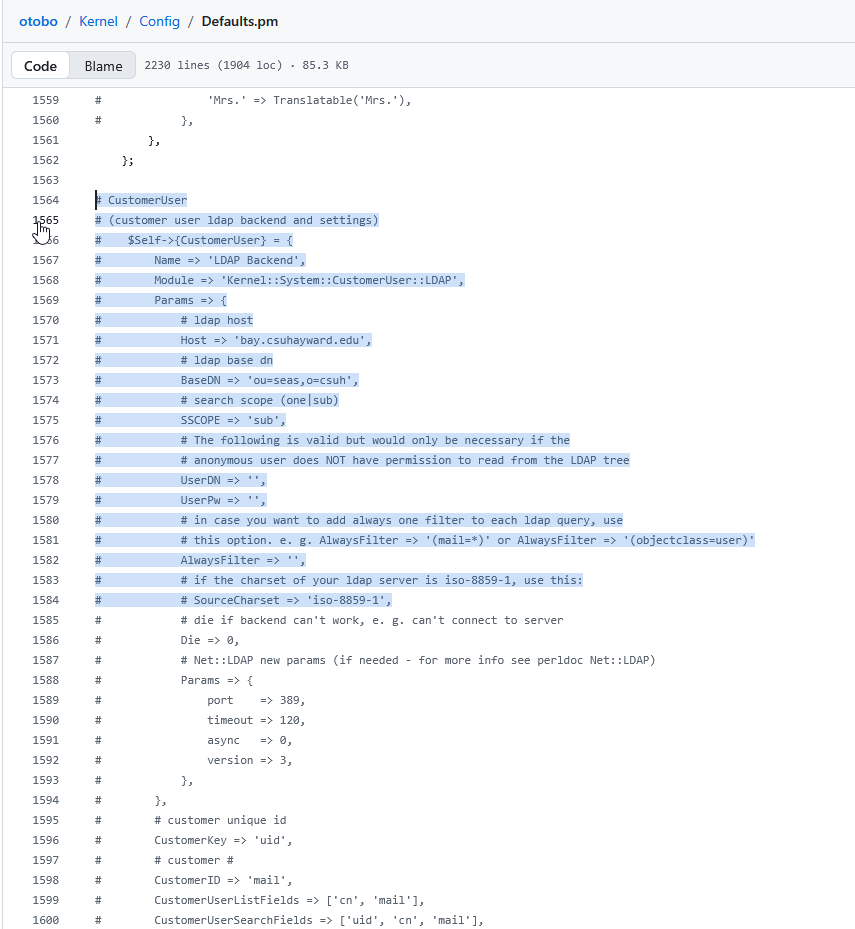
Yes, in Kernel.Config.pm
Search for „SourceCharset“
Example from Defaults.pm
line 1585

-
-
AutorBeiträge


- Du musst angemeldet sein, um auf dieses Thema antworten zu können.