• Deutsch
  • English
  • Anmeldung OTOBO Community
+49 (0)9427 68 39 000
OTOBO
  • SOFTWARE
    • Software | Überblick
    • IT Service Management
    • Customer Service Management
    • Enterprise Service Management
    • Demo
    • Download
    • Dokumentation
  • SERVICES
    • Überblick Services
    • Beratung
    • Training
    • Entwicklung
    • OTRS Migration zu OTOBO
    • Support
    • Managed Service
    • Support-Portal
  • UNTERNEHMEN
    • Über uns
    • Karriere
    • Partner
    • Kontakt
    • Newsletter
  • RESSOURCEN
  • COMMUNITY
    • Open Source
    • Community Forum
    • Download
    • Dokumentation
    • OTOBO übersetzen
  • Click to open the search input field Click to open the search input field Suche
  • Menü Menü
Topic Resolution: Answered

Schlagwörter: oauth2 otobo IMAP Pop3

Ansicht von 10 Antwort-Threads
  • Autor
    Beiträge
    • 25. August 2021 um 10:30 Uhr - Views: 5091 #11869
      Answered
      olivier-cimbaluria
      Teilnehmer

        Hello,

        I have a issue configuring the email collector which Exchange Online.

        I created an application in AzureAD which a redirectURL like https://fqdn/otobo/index.pl?Action=AdminMailAccount

        I configured the core/email/oauth2 system parameters with the secretID, domaine name, and applicationID but each time I create a new postmaster email, I’m redirected to the redirectURL (https://fqdn/otobo/index.pl?Action=AdminMailAccount) and I have this error in the system logs :

        Can’t perform POST on https://login.microsoftonline.com/common/oauth2/v2.0/token: 401 Unauthorized
        Could not request access token
        Got: ‚401 Unauthorized‘!

        Thanks for your help.

      • 20. April 2022 um 6:58 Uhr #13060
        Franz Metzger
        Teilnehmer

          Hello Oliver,

          I have exactly the same problem here. Were you able to fix this without the help of the community?

          THX,

          Franz

        • 8. Juli 2022 um 10:10 Uhr #13414
          Michael Stechhammer
          Teilnehmer

            Hey there,


            I am facing similar issue.

            Any help?


            Thx,

            Michael

            • 22. Juli 2022 um 13:05 Uhr #13470
              Pascal Stierli
              Teilnehmer

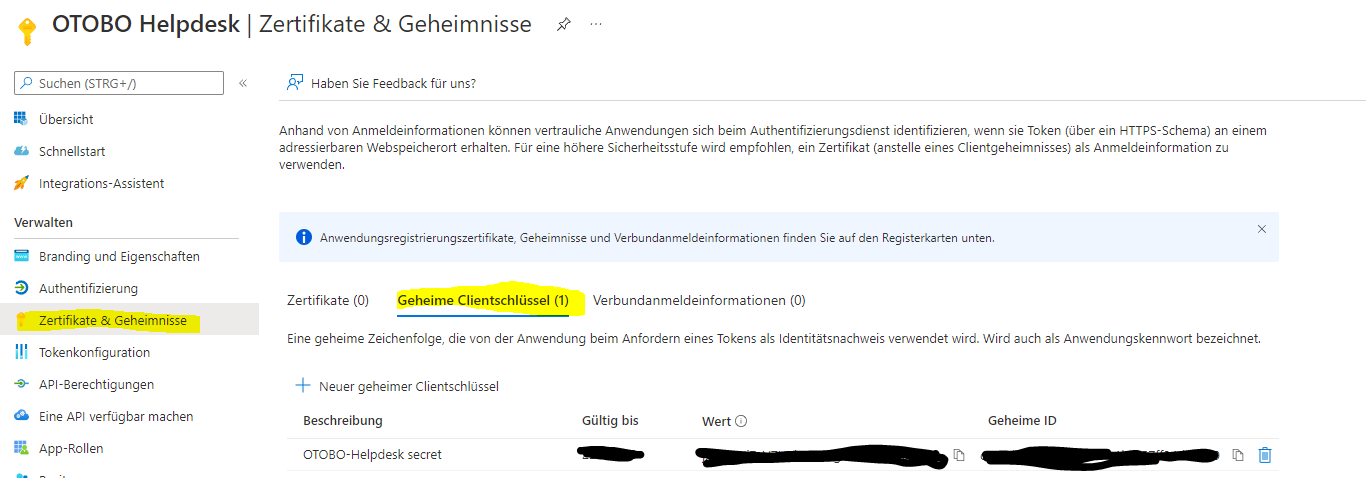
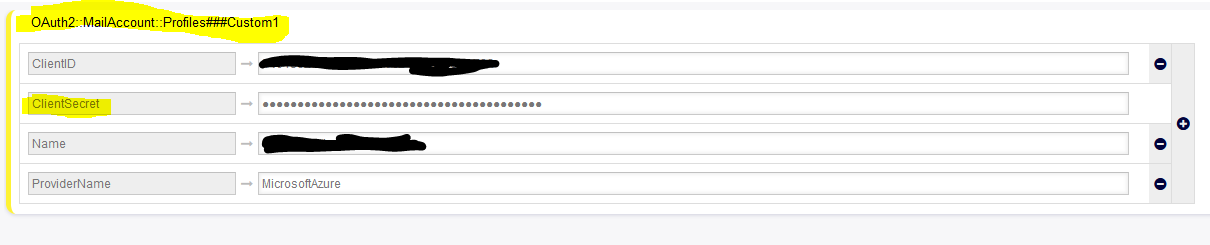
                Just had the same issue. You need to create a „secret“ within Azure for your App and add this secret within Otobo-Configuration. Afterwards I was able to auth via OAuth2 and fetch mails :)


                1. Create a secret in Azure (should be „Certificates and Secrets“ in english
                2.  Copy the Value from the Column „Wert“ (Value in english, 3rd Column from left) and enter it within otobo oauth profile configuration (and of course the client id if you didn’t provided it yet):

                Now try to configure mail fetch with OAuth2 again :) Hope this solves your Problem.


            • 9. Juli 2022 um 8:42 Uhr #13417
              Pawel Bosak
              Teilnehmer

                Hi, guys which api permission you set in azure app?

                They should be

                • Microsoft graph:
                • IMAP.AccessAsUser.All
                • offline_access
                • POP.AccessAsUser.All
                • User.Read


                Next You should grant admin consent for organization for all permission (do it in app registration and enterprise application on permission tab)

              • 9. Juli 2022 um 8:43 Uhr #13418
                Private Reply
                Pawel Bosak
                Teilnehmer
                  This reply has been marked as private.
                • 22. Juli 2022 um 12:49 Uhr #13469
                  Pavel Lyachin
                  Teilnehmer

                    Hi!

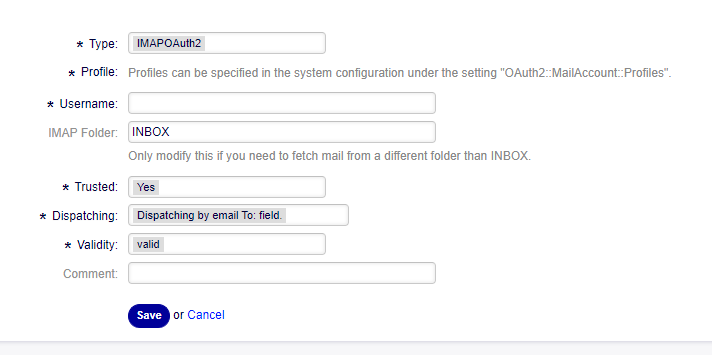
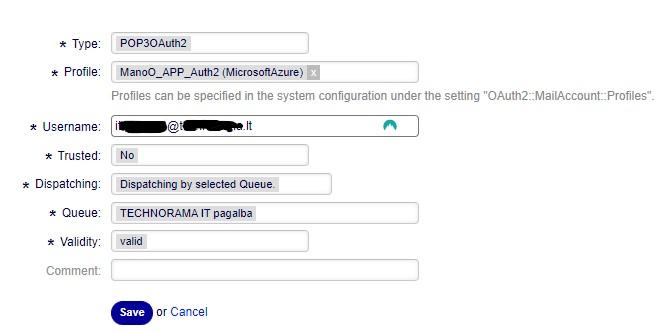
                    Faced with the problem that it is impossible to select a profile when creating a postmaster account.

                    Profile and provider configured, but I can’t select the right one. Profile value is not populated in mysql table. And apparently that’s why the Office 365 authorization window does not open.

                    Is this a bug? And how to win it?

                    Thx for answers!

                    PS: I’m using Google translate, because it’s not my native language.


                    • 22. Juli 2022 um 13:57 Uhr #13473
                      Private Reply
                      Pascal Stierli
                      Teilnehmer
                        This reply has been marked as private.
                      • 25. Juli 2022 um 12:33 Uhr #13479
                        zzz
                        Teilnehmer

                          Hello Pavel,

                          Interesting, it looks like your server is not using /opt/otobo/Custom/Modules*. This might be caused by Issue #1650.

                          Please check if your Apache config contains following line:
                          PerlSwitches -I /opt/otobo -I /opt/otobo/Kernel/cpan-lib -I /opt/otobo/Custom

                          If so,  replace it with this line:
                          PerlPostConfigRequire /opt/otobo/scripts/apache2-perl-preload_otobo_psgi.pl

                          Restart the web server and check if profiles appear.

                          Your feedback would be appreciated!

                          Best regards
                          Emin

                        • 26. Juli 2022 um 6:47 Uhr #13483
                          Pavel Lyachin
                          Teilnehmer

                            Thank you! You have been very helpful!

                            The problem was precisely this.


                            I’m using OTOBO 10.1.4 based on Rocky Linux 8.6 without dockers.

                            Initially, a migration was made from the OTRS 6 Community Edition.

                            Maybe this information will be valuable in the analysis of the origin of this bug.


                            Best regards

                            Pavel


                        • 25. Juli 2022 um 4:09 Uhr #13478
                          Pavel Lyachin
                          Teilnehmer

                            Unfortunately, I’m not a topic starter or a moderator, so I can’t read the post above.

                          • 7. Oktober 2022 um 6:02 Uhr #13968
                            Best Answer
                            Stefan Rother
                            Administrator

                              Hi,

                              we create a detailed description about OAuth2 Authentication:

                              https://doc.otobo.org/manual/admin/10.1/en/content/communication-notifications/postmaster-mail-accounts.html#pop3-and-imap-oauth2-authentification

                              I hope that helps,

                              Stefan

                            • 24. November 2022 um 15:39 Uhr #14305
                              Domas Ubys
                              Teilnehmer

                                Hello,

                                I have an issue with the OAuth2 Authentication setup.

                                I have made all configurations as in show in the manual, but I don’t receive emails from the server.

                                I don’t receive new tickets :(

                                When I add under „Admin -> PostMaster Mail Account“ connection credentials and then save the settings I’m redirected to  „Azure  Active Directory“ login.

                                After entering the password, then I Accept Azure information and I’m redirected to the Otobo Dashboard.

                                I don’t receive any problems from wrong connections and et.c

                                But, when I check configuration under „Admin -> PostMaster Mail Account“ – there is no set configuration.

                                Where can be a problem, and how I can solve it?

                                Best Regards,

                                Domas

                              • 25. November 2022 um 15:08 Uhr #14315
                                Domas Ubys
                                Teilnehmer

                                  I found where was the issue in my case. Redirect URL  must be this = https://<OTOBO address>/otobo/index.pl?Action=AdminMailAccount

                                • 5. Dezember 2023 um 11:34 Uhr #16045
                                  Hristo Hristov
                                  Teilnehmer

                                    Hello, I have the same issue, how did you fix it Domas, because I’m getting redirected to this URL

                                    https://<OTOBO address>/otobo/index.pl?Action=AdminMailAccount

                                    But still can’t find the configured Postmaster Mailaccount.

                                • Autor
                                  Beiträge
                                Ansicht von 10 Antwort-Threads
                                • Du musst angemeldet sein, um auf dieses Thema antworten zu können.

                                Foren durchsuchen

                                Anmeldung

                                Anmeldung

                                Konto erstellen
                                Passwort vergessen?

                                Login via Social

                                Profil

                                Bitte vervollständigen Sie nach der Registrierung Ihr Profil, das vereinfacht die spätere Kommunikation enorm. Ihre Profileinstellung finden Sie, wenn Sie auf Ihr Avatarbild klicken.

                                Sie können Ihren Avatar ändern, indem Sie sich mit Ihrer E-Mail-Adresse unter gravatar.com registrieren.

                                Letzte Aktivitäten

                                • FAQ: kaputtes Copy & Paste von Bildern zwischen Artikeln
                                • Dynamische Felder in AgentTicketNote mit ACL verstecken
                                • Benachrichtigung „Ticket wurde mir entzogen“ möglich?
                                • Statistik Anzahl Tickets pro Agent
                                • Docker: Ändern des redis Hosts

                                Unternehmen

                                Über uns
                                Karriere
                                Stellenbörse
                                Partner werden
                                Kontakt
                                Newsletter

                                OTOBO | Simplify work and create exceptional service experiences.

                                Die Source Code Owner und Maintainer hinter OTOBO.

                                Software

                                Service Management-Plattform
                                OTOBO Demo
                                OTOBO Download
                                OTOBO Dokumentation

                                Security-Problem melden:
                                security@otobo.org

                                Services

                                Support-Portal
                                Beratung
                                Training
                                Support
                                Managed Services
                                Erweiterung
                                OTRS Migration
                                Partner finden

                                Community

                                Open Source
                                Community Forum
                                Mitmachen
                                OTOBO Developer
                                OTOBO@GitHub

                                © 2026 Rother OSS GmbH | All rights reserved.
                                • Cookie-Einstellungen
                                • Impressum
                                • Datenschutz
                                • Haftungsausschluss
                                Nach oben scrollen Nach oben scrollen Nach oben scrollen